Category: General

  • When’s the right time to sell my Apple watch?

    When’s the right time to sell my Apple watch?

    The first Sunday of every November is the start of daylight saving, which means that you have to manually adjust every clock in your home and workplace if devices aren’t smart enough to do it automatically. Now you’re dealing with a wall clock, the time on your stove, and the time displayed in your car. With so many devices displaying the time at once and your phone already on hand, you don’t know why you even bother owning an Apple watch. 

    The Apple watch gained popularity in 2015 for its modern look and ability to tell the time while also being able to track fitness, display notifications and make messaging easy.

    Despite the Apple watch’s convenient features, people still find that they use their smartphone more due to: 

    • The small display screen

    • Not being able to properly brows the web

    • Not being able to access the same apps on their phone 

    • The short battery life 

    • The bulky look 

    Even though it is great competition, an analog watch or smartphone will probably never be entirely replaced by an Apple watch due to their long battery life and access to detailed information and notifications.  

    If you notice that you are no longer using your Apple watch as much as you used to and are looking to sell it, there are things to consider if you want to make the most cash. 

    While Apple, Best Buy and phone carriers do offer store credit, gift cards and trade-ins, if you are not looking for a device upgrade, there is probably no point.

    Stores 

    Apple Watch Series 1

    (in great condition)

    Apple Watch Series 2

    (in great condition

    Apple Watch Series 3

    (in great condition)

    Apple Watch Series 4

    (in great condition)

    Apple Watch Series 5

    (in great condition

    Apple 

    Store Credit or gift card 

    Store Credit or gift card 

    Store Credit or gift card 

    Store Credit or gift card 

    Store Credit or gift card 

    Best Buy 

    Gift Card 

    Gift Card 

    Gift Card

    Gift Card 

    Gift Card

    Carriers 

    Trade-in

    Trade-in 

    Trade-in 

    Trade-in 

    Trade-in 

    Tech Reboot 

    Cash 

    Cash 

    Cash 

    Cash 

    Cash 

     Marketplaces such as eBay is another place to sell if you want your Apple watch out of your hands, but other people have the same idea. Searching for the Apple Watch Series 1 alone brings up over 1,200 options. 

    You may make money… eventually, but if you are looking to make cash quickly and get a free instant quote, Tech Reboot is a great option when looking to sell your Apple watch. 

    How to sell your Apple watch with Tech Reboot

    Visit our Apple smartwatch page and get a free instant quote. You will need to choose your model, and then complete details about the size, case type, carrier and condition of your Apple watch. Your quote will magically appear and then all you have to do is fill out some personal details and where you’d like your money sent!

    Whether your Apple watch is in excellent condition or broken, Tech Reboot still finds it valuable.


  • Can I sell my broken iPhone, Galaxy or Pixel?

    One too many times, someone experiences the pain of watching their phone slip between their fingers and crash to the ground as it and their heart simultaneously shatter.

    What to do now? You are out of a phone and short on cash. Believe it or not, there is still a way to recycle your phone and make some money.

    Whether your phone has water damage or a broken screen, it is still valuable. At Tech Reboot we truly believe one man’s trash can lead him to treasure.

    Even though there are several companies that make the same offer, Tech Reboot is valued for its services because:

    1. We offer some of the biggest payouts
    2. Checkout and shipping are stress-free
    3. Our payments are swift and simple
    4. Transactions can be made within the safety of your home

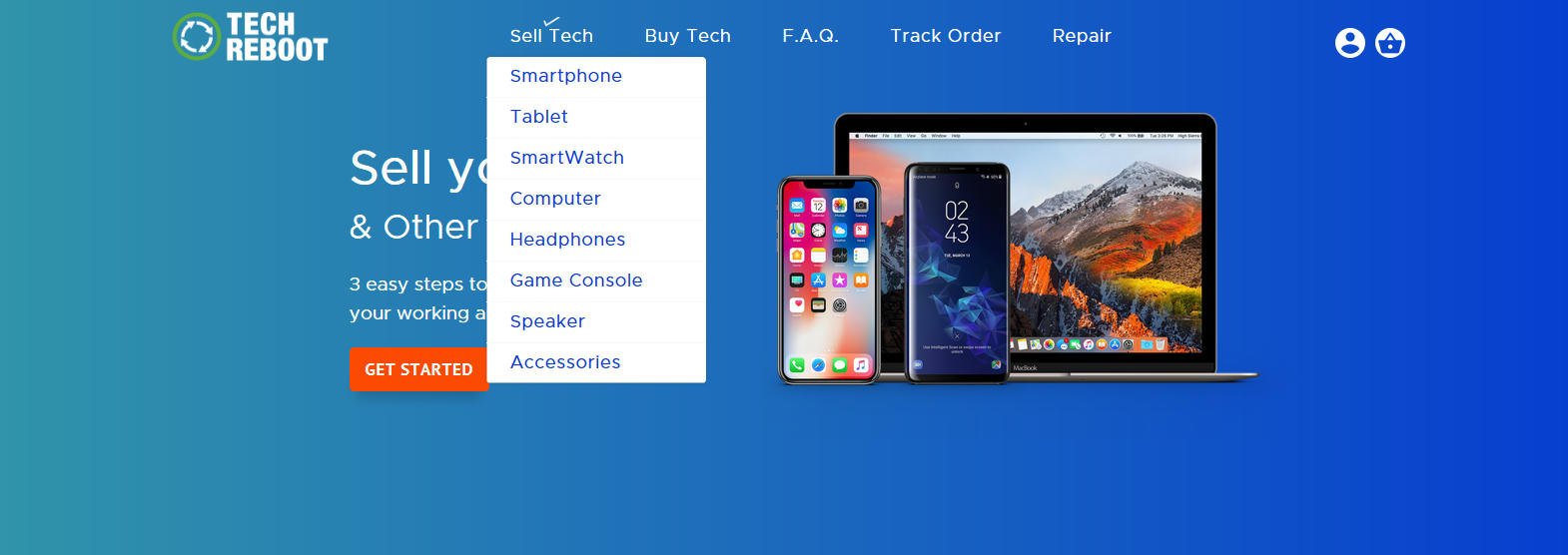
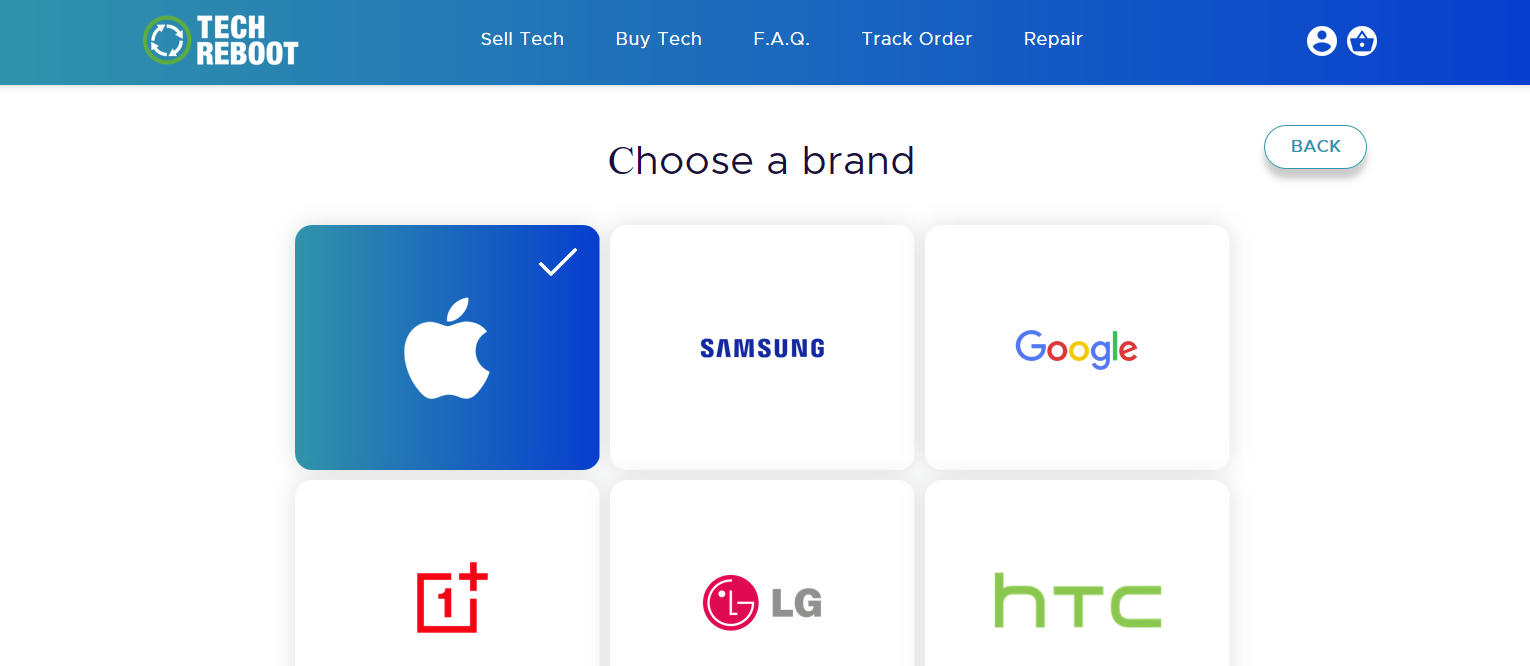
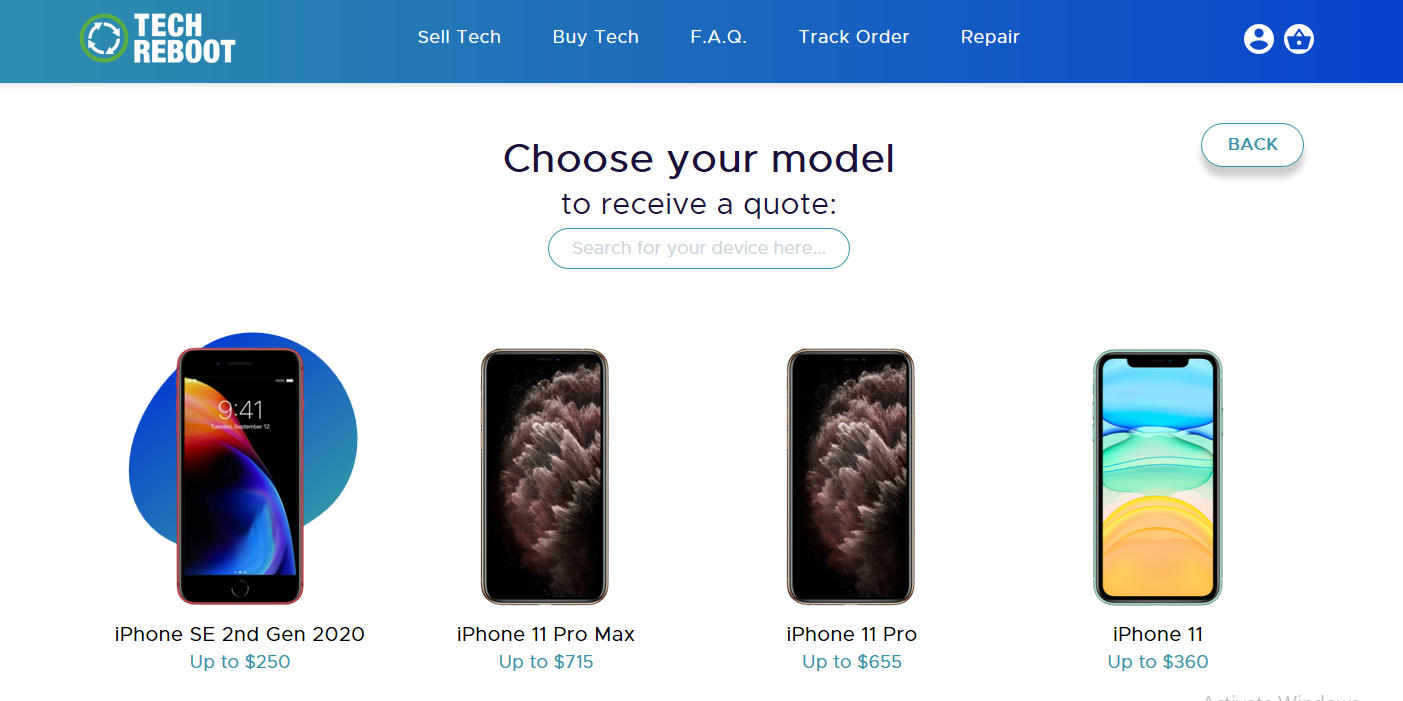
    To make your selling process easy, first visit our site. When on the homescreen, hover over Sell Tech and select Smartphone. From there, you are able to choose your phone’s brand, model, storage and carrier details. The final step is to select the quality of your phone- in this case you would select Broken- and our offered price will appear.

    Selling Your Broken Phone - Select Sell Tech then Smartphone

    Hover over Sell Tech and select Smartphone.

    Selling Your Broken Phone - Choose the brand of your Smartphone

    Choose the brand of your smartphone.

    Selling Your Broken Phone - Choose the model of your smartphone.

    Choose the model of your smartphone.

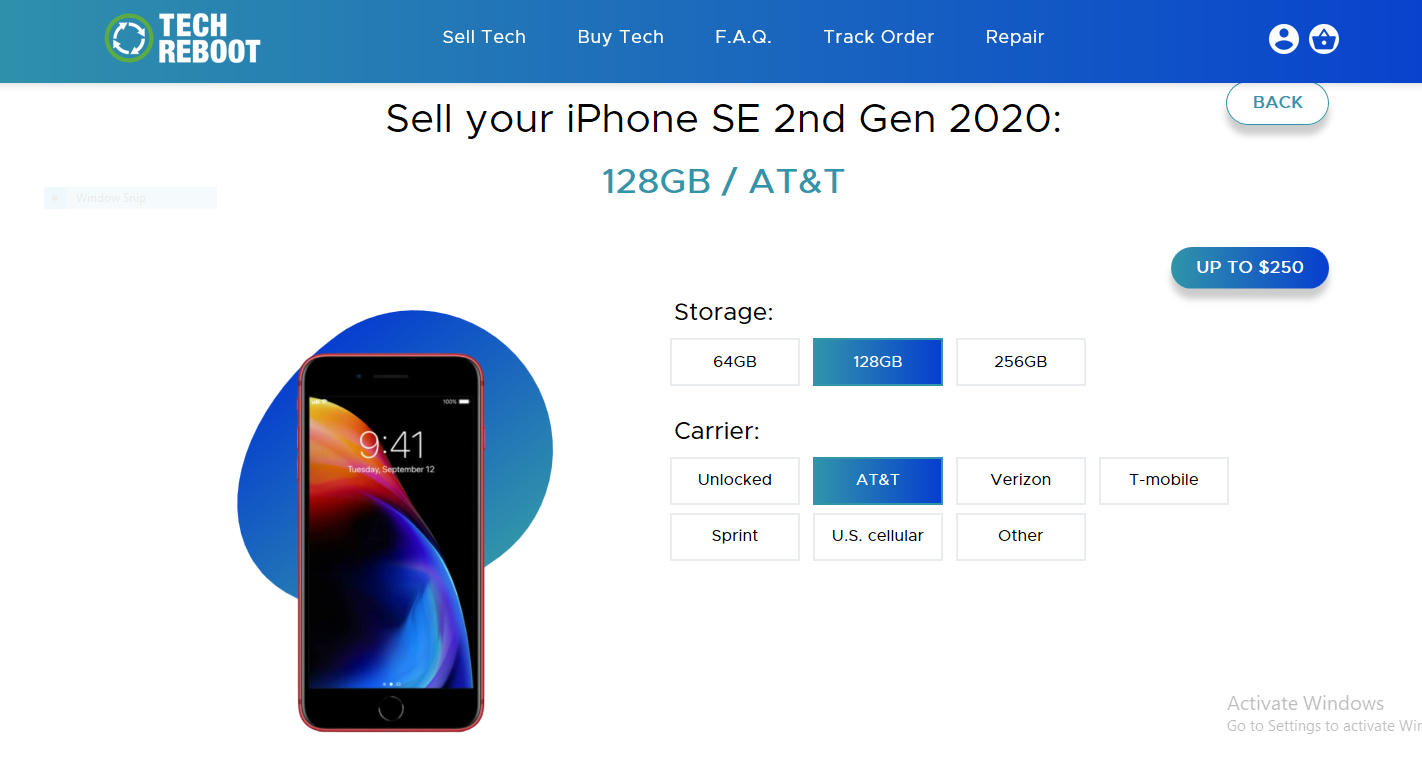
    Selling Your Broken Phone - Choose your smartphone’s storage and carrier details.

    Choose your smartphone’s storage and carrier details.

    Sell Your Broken Phone - Choose the appropriate condition of your phone.

    Choose the appropriate condition of your phone. Our offered price will then appear.
    (This is the result for a broken Apple iPhone SE 2nd Gen 2020 with 128 GB from AT&T, current as of Nov 2020. Values will change over time.)

    Let’s say your phone dropped and is not in the best condition, but you still don’t know what to select.

    At Tech Reboot, a smartphone is considered broken if:

    • The device has some issues
    • Cracked glass
    • LCD burn
    • Bad microphone
    • Bad speaker
    • Bad camera

    Once you accept the offer and fill out basic information, a shipping label and packing slip will be sent your way!

    Payments typically take two business days upon arrival and are done through trusted vendors such as:

    • Apple Pay
    • Zelle
    • Cash App
    • Venmo
    • PayPal
    • Amazon GCard
    • Google Pay
    • Facebook Pay
    • Check

    Tech Reboot also accepts tablets, computers, smartwatches and other smart devices.

  • SIM Card Frequently Asked Questions

    SIM Card Frequently Asked Questions

    What is a SIM card?

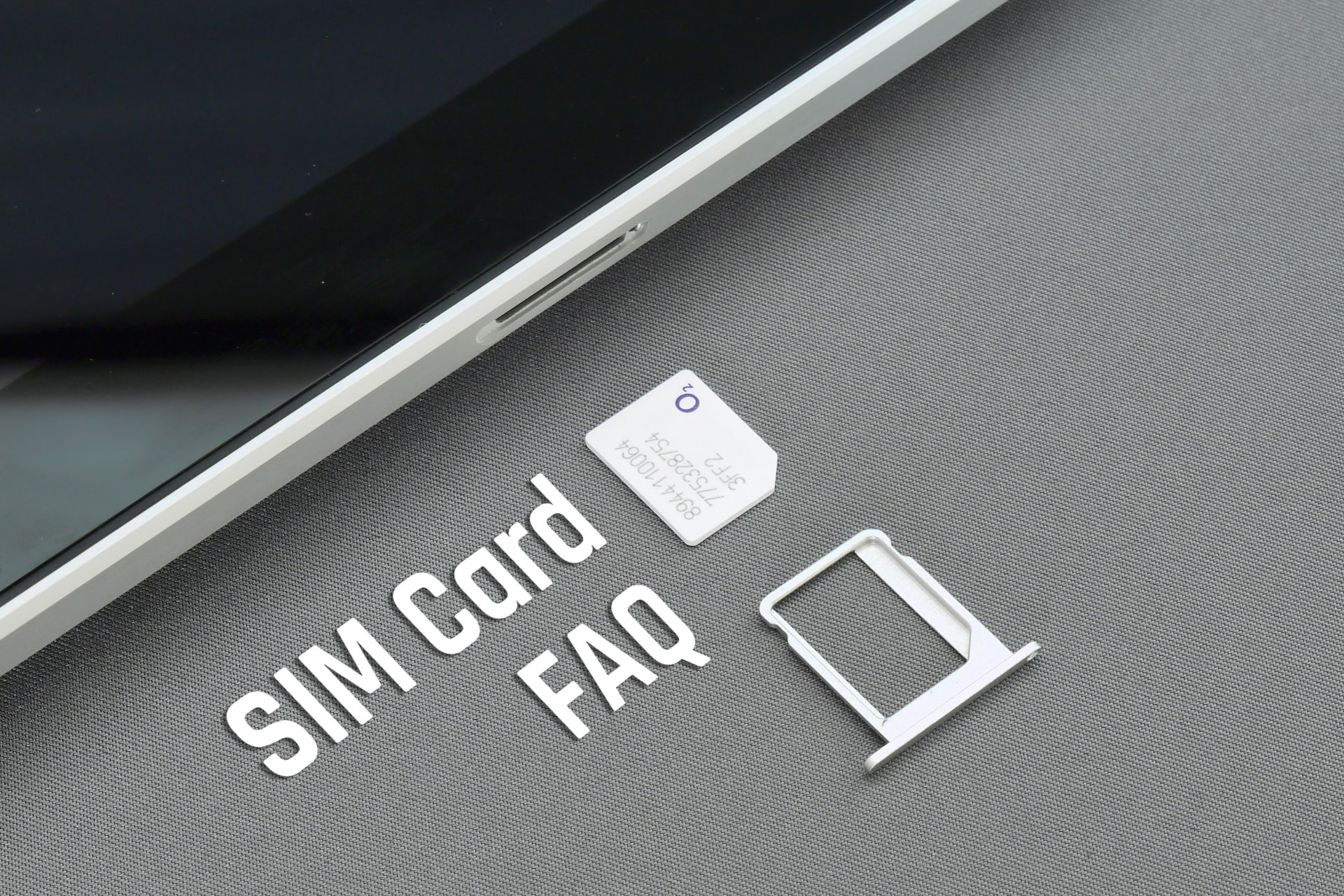
    SIM (Subscriber Identity Module) Cards connect your physical phone (or tablet) to your phone carrier. They let carriers know who owns any specific smart device and which phone account is theirs. In most cases, SIM cards are portable and can be swapped between your current or old phone and a newly-purchased phone.

    SIM card Sizes

    Nano SIM: The smallest SIM, most likely to be found in new devices. This has been the standard since the iPhone 5. Since 2014, this size has been the most common for both iOS and Android phones.

    Micro SIM: A medium SIM, normally used in previous model devices. Created in 2003, this was the standard size until the iPhone 4, which was released in 2010. Essentially this was a standard SIM with the surrounding extra plastic trimmed down.

    Standard SIM: The largest SIM, aka Mini-SIM, is found in older devices. Phones designed from 1996 – 2010 used this size.

    SIM cards come with adapters to work in devices that require nano, micro, and standard SIMs.

    What is stored on a SIM card?

    A small amount of data is stored on SIM cards, typically a unique user identification, a phone carrier, and a country code. This is all encoded into 17 digits.

    Data Stored on SIM cards

    • Unique User ID
    • Specific Phone Carrier
    • Country Code

    How do I install a SIM card?

    Start by locating your SIM card tray. On an iPhone (4s or later) the SIM card tray is on the right side, opposite the mute/vibrate switch and the up/down volume buttons. You should see a small pinhole. Samsung Galaxy SIM trays are either under the removable back cover and battery (Galaxy S5 and earlier) or on the side of the phone (S6 or newer).

    If you push the bent-out tip of a paper clip into the hole gently, the SIM tray should pop out. On an older Samsung Galaxy with a removable battery, you can pull and slide the card out once you’ve removed the back cover with a gentle pry and also the battery. DANGER Do not poke or pry the battery, just use gentle force.

    You can now remove the SIM card and install your new one, making sure to put the same side up.

    If your SIM card is too small to fit in the tray, you will need an adapter. If your old SIM card is too large, you will need to get a replacement card as described below.

    Where do I get a replacement SIM card?

    Call or visit your carrier website, or visit a store in person.

    AT&T Wireless customers, call (800) 331-0500. For your safety, only the account owner or retail authorized user can order and activate a new SIM card.

    T-Mobile users can call customer service (800) 937-8997 or visit a store in person.

    Verizon customers can order a new SIM card online.

    Can you switch your SIM card to a different phone?

    Maybe. If you are switching to a new phone that is unlocked or on the same carrier network technology (CDMA or GSM, depending on your carrier), then you CAN switch to a different phone easily. The new phone must be compatible with your SIM card size or you may need to request a new card replacement or use a SIM card adapter.

    SIM card Handling Tips

    • Don’t touch the gold contacts if it can be avoided.
    • Don’t bend the SIM card.
    • The gold contacts must be aligned correctly to the gold contacts on the device. An angled cut-off notch on the corner of the SIM card is there to help you orient the SIM to the device.
    • If the SIM card is incorrectly inserted, or the wrong size SIM is inserted, you will probably see an error message: “SIM card Failure”, “No SIM card inserted. Please insert SIM card.”, etc
    • Keep the SIM card clean and dry at all times.
    • Avoid extreme temperatures and magnetic fields.

    Remove Your SIM card Before Selling Your Phone

    If you are selling your phone to Tech Reboot, go ahead and remove your SIM card as described above. If it fits in your replacement phone, you can save yourself the trouble of getting a new SIM card. Tech Reboot does not save SIM cards left in phones sold to us; they are immediately discarded.

    Photo by Brett Jordan on Unsplash

  • How much does it cost to unlock a phone in 2020?

    How much does it cost to unlock a phone in 2020?

    So you bought a phone and you’re not sure if you’re able to activate it or use it on a particular
    carrier?

    There’s a lot of confusion when it comes to what carrier a device can be used on.

    Certain
    carriers require devices that work on their network and only their network. They do this so that this particular
    change would keep your device from function on a competitor’s network.

    Years back, the only option you would
    have is to go to the actual carrier, and fork over a bunch of cash to get a device unlocked from their
    network. Now you can simply log onto a website or give them a quick call with no extra fees to get your phone
    connected and unlocked to function on any other carrier.

    If you bought a device that’s currently locked to
    another carrier, there is a chance that you can unlock it, but you will have to check off a few tasks to make that
    happen. Do some studying and make sure that you choose you’re unlocking partner selectively and make sure you’re not
    succumbing to fraud or a scam.

    What exactly are phone locks?

    Locks exist so that carriers can keep their clients for as long as they possibly can. They’ll do
    just about anything to keep that contract in place and so that the customer doesn’t choose to go to one of their
    competitors. For many years they effectively enforced that. Many devices were difficult or expensive to
    bypass.

    The lock is simply a line of code written into the back and operating system of your phone that tells
    the software what carrier to activate and which one to deny. To run an unlock on that device, that line of code must
    be replaced in the software. If you take out that line of unlock code your device will only work on the carrier that
    it is assigned to. There’s no way to bypass that software without getting a new line of code.

    How can a company tell if your device is locked or unlocked?

    There is an identifier that is called the international mobile equipment identity number which is a unique identifier
    to that particular device and it indicates what carrier it is also locked to or unlocked.  

    Your
    identity number can be found by:

    • Going into your general settings. There is typically an about menu that
      contains this info
    • Typing #06# into your phone. This will popup a menu that shows your number.
    • Check the back housing, or where the battery is stored. There’s usually a sticker or an engraving that indicates
      the international mobile equipment identity number.
    • Check the devices that you got it in. They’re usually is a sticker printed on the back or inside of the box
      that provides the original international equipment identity number.

    This number is not unique to you your account. It stays with the life of the phone. Before it can be
    unlocked, you’ll need to locate your IMEI number. This identifier contains any information regarding:

    • The phone’s original carrier
    • Whether it’s owned or on a payment plan
    • If it has ever been reported lost or stolen

    If a company pinpoints an issue with your identifier number, then your device may never be eligible
    to be unlocked.

    How much does it cost to unlock a phone?

    Luckily, nowadays, if you’re on a locked phone, and you purchased it months ago and have been making payments
    with your carrier and have had no issues, you should be able to simply pick up the phone, or visit their website
    process. It hasn’t been this easy until recently to unlock your device.

    In 2013, carriers came together and
    agreed that eligible phones should be unlocked at no cost. This is according to the FCC documents.

    The take
    away here is that it is still up to the carrier whether or not your phone is eligible to be unlocked, and their
    rules change and are very different from company to company.

    With AT&T, you have to prove that
    your device has been fully paid off and that all bills and obligations have been met. Even then, it is still up to
    the company to approve or deny any request.

    With Sprint, you have to show that the phone was on the
    network successfully for at least 50 days and that your phone is paid in full, and all bills and obligations with
    the carrier have been met.

    Verizon makes it pretty simple. Just make sure you pay it off, and it’s
    unlocked. Simple as that. The majority of their devices are like this from the factory once they are paid off. All
    the phones are 4G LTE.

    T-Mobile you must provide proof that you use the phone on the network for at
    least 40 days, and that you purchased your device, and all the bills are satisfied and paid. You also need to offer
    proof of purchase. They don’t make it very easy, and even using unlock services can yield failure on unlocking if
    any or all these checkboxes are not completely met.

    These breakdowns may change from time to time and for
    one company to another. Cell phone companies have agreed to show their requirements, and make them easily accessible
    to customers. It might even be part of the initial onboarding paperwork they provide you that came with the device,
    or you can find the details on their website.

    What if you bought a locked phone?

    Buying a phone online can save you quite a bit of cash, but some forms that are being sold online come with their
    locks being permanent. If you try to use them another carrier, may be met with things like outstanding balances owed
    on the devices, or permanently locked to a carrier.

    We know it’s annoying, but with a little bit of due
    diligence and time, you’ll find the right solution for what you’re trying to find. This may either be a locked
    device that you intend to use on a specific carrier, which can save you a lot of money.

    We recommend that you
    check in with your carrier first and bring any paperwork from your device purchase. This could be enough to help
    convince the company to unlock your device.

    For example, Sprint will unlock phones that are eligible if you
    can prove the name and the full account number of the previous device on. Also, you may have to provide proof of
    purchase of the device that you are looking to unlock.

    These pieces of information are carried through the
    appropriate paths, and if the phone is on hold, will help result in you receiving unlock for a little to no
    cost.

    Not all carriers will be willing to help, unfortunately.

    A lot of companies are concerned about
    folks being scam or fraud, and they don’t want any kind of association or liability from unlocking a device to the
    wrong party.

    How do 3rd party companies unlock devices then?

    Third-party may have access to software and unlock codes from some carriers it will still verify the status of
    your device to protect against any kind of fraud or theft, but they are compensated when they can unlock a phone.
    You might have some obstacles in your way either way though.

    Most companies can process and unlock
    electronically or their website. Some even provide instructions on how to do it yourself. No matter what route you
    choose you’ll need that unique identifier number, the IMEI, that we discussed earlier in this post.

    Whatever
    path you take, you will need the IMEI, as that is the unique identifier for the device.

    They will check this
    IMEI against various databases to check for things like theft or fraud.

    Pricing varies, depending on the
    type of device you have, as well as the carrier. All these factors play into complexity potentials when it comes to
    unlocking that particular device. The more complex it is, the more expensive it will be.

    You can typically
    expect to pay anywhere from $0 up to $50 to process the unlock.

    While not overly expensive, it is nice
    knowing that it is overall affordable to process an unlock.

    Be sure that the company you select the process
    unlock if it’s not the main carrier that the device was on, is a reputable and trustworthy company. There are
    underground organizations that look for IMEI numbers that can utilize those numbers in unjust ways. There are tricky
    and scammy ways that this number can be used, so make sure it isn’t out in public. Before handing over this number,
    just make sure that the company handles it carefully.

  • Do pawn shops buy phones?

    Do pawn shops buy phones?

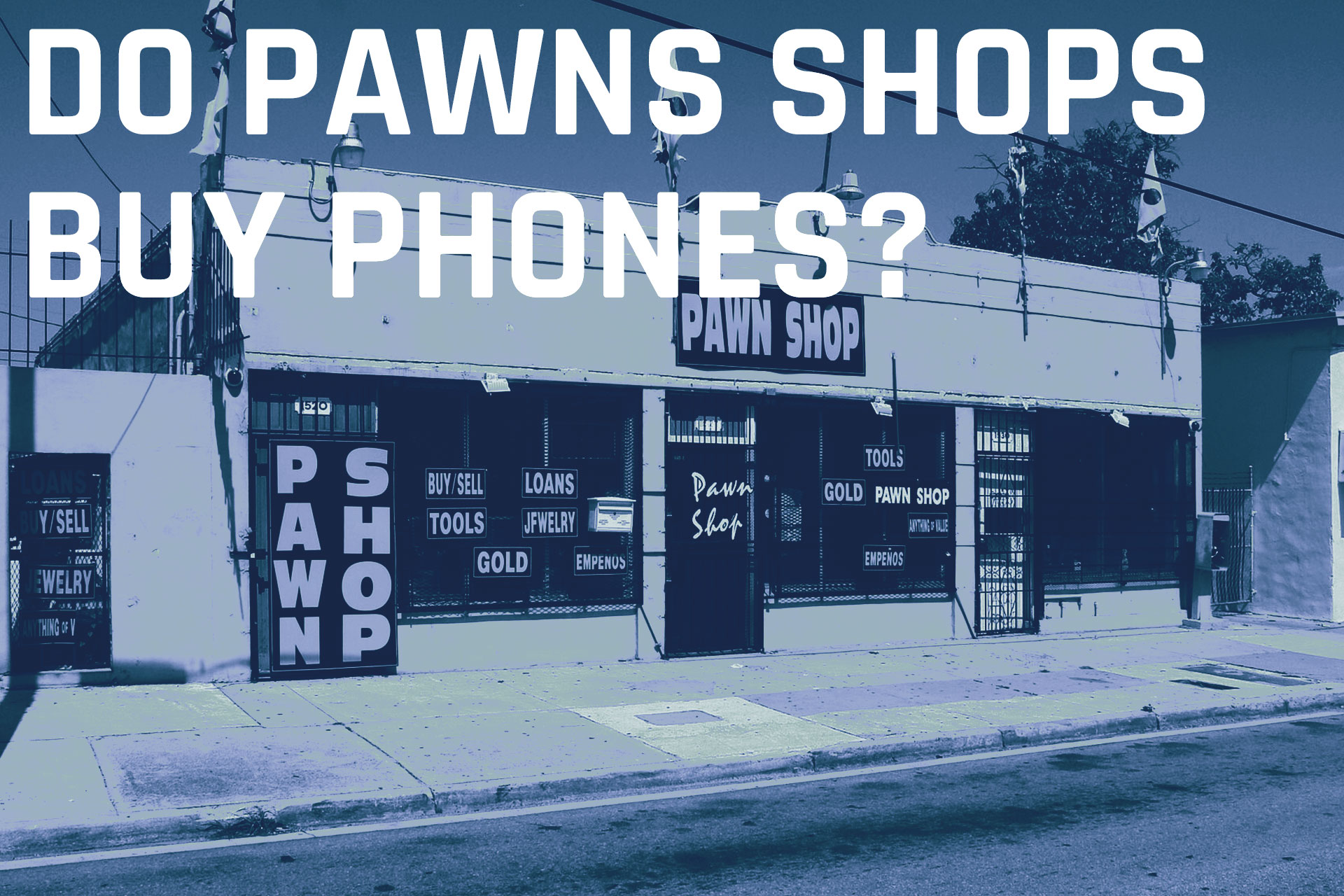
    Pawnshops typically purchase or pawn just about anything. The problem you will run into is that they may not pay you
    what your device is worth, being that they don’t specialize in mobile devices and smartphones. They will likely pay
    you
    pennies on the dollar compared to what a buyback company like Tech Reboot will payout.

    Often when you’re dealing with companies like pawn shops, they don’t know the true value of an iPhone, iPad, or
    Macbook.
    When you don’t know the true value, you will not get an accurate quote on what to sell it for.

    How do you calculate an accurate buyback price of a device?

    There are a lot of factors that go into calculating the buyback price of a device.

    • Grade and condition of the device
    • Lock/unlock status
    • Cellular service carrier (if the phone is locked)
    • Device storage capacity
    • Original accessories included/excluded

    A few things are certain, the better condition it is in, and the larger storage it has, the more it’s worth.

    We recommend keeping your phone safe in a good quality case, keeping it clean, and try your best to not break your
    device.

    To Pawn or Not to Pawn

    The wild thing is that even a broken phone carries value. We recommend that you utilize a company that specializes in
    buybacks to ensure that you maximize your return.

    It’s important that you pair your safety with your return. Ease of sale and maximum return will ensure that you sell
    your device correctly. We’d urge you to not visit a pawn shop, as you will walk out with far less money than if you
    were
    to use a buyback service.

    If getting cash back for your old phone isn’t a top priority, then look into donation options, along with charities
    that
    collect mobile devices.

  • How do I remove iCloud Lock or Google Lock Remotely?

    How do I remove iCloud Lock or Google Lock Remotely?

    So you send in your phone and forget to remove the iCloud or Google
    lock from it. Not to worry, there is a solution for it. There is a quick and easy process to remove iCloud lock
    from your iPhone, iPad, iPod, or Macbook.

    Remove iCloud lock
    from iPhone/iPad/iPod/Macbook remotely:

    1. Sign in to iCloud.com with your Apple ID.

    2. Go to Find My iPhone.

    3. Click All Devices at the top of the screen.

    4. Select the device that you want to remove from
      iCloud.

    5. Click Erase [device].

    6. Select Next until the device is erased.

    7. Click Remove from Account.

    If you have an android device and need to remove Google Lock,
    follow the following easy steps to complete it:

    1. Log into your Google
      account
      .

    2. Once logged in, go to Device activity and notifications
      (located under Sign-in and security).

    3. Next click on Review devices under recently used
      devices).

    4. Select the device you wish to remove from your Google
      account and click the red Remove button beside account
      access.

    5. There will be a confirmation window, select Remove.

    6. A confirmation window will show that the access has been
      removed from your device.

    7. To confirm, you can check the list of recent phones. The
      selected phone will show Access removed.

    Please Note:
    Once you’ve removed the Google account access online you will need to
    perform the reset from the settings on the phone you needed the lock removed on. On some devices will request
    the Google account information during setup.

    72 Hour Google Lock:
    If a Google password is changed and the device is immediately factory
    reset, a message will appear when you restart it that says: “Please sign in
    using one of the owners accounts for this device” This indicates the
    google account on the phone is now locked for 72 hours and you must wait
    for it to reset. This usually only affects Samsung devices.

    Photo by Jon Sailer on Unsplash

  • E-Waste Fast Facts

    E-Waste Fast Facts

    E-Waste Fast Facts

    • 3.2 million tons of electronic waste are generated per year
    • Currently, only 11% is recycled
    • 250 million computers become obsolete in the next 5 years
    • 130 million mobile phones are discarded per year
    • About 50% of all recycled metals in the U.S. are derived from consumer electronics recycling
    • 25 consumer electronics per US household on average

    Moore’s Law, which states that the primary technologies incorporated in all of these devices doubles in speed every 18 months, drives a tremendous amount of turnover. Everybody wants the latest greatest gadget. So e-waste has became a growing concern.

    Tech Reboot can recycle your old smartphones, tablets, and computers, reusing parts that are
    still operational, thereby reducing the generation of excess electronic waste.

    • Buy pre-owned devices
    • Sell us your old phone or tablet
    • Recycle your lost causes

    Tech Reboot recycles smartphones, tablets, and laptops for you.

    iFixYouri, our sister company, has been working in smart device repair since 2010. We have the technical experience to handle your device end-of-life management whether that may be buyback, recycling, or refurbishing.

    All components of any donated or received smartphones, tablets, and laptops past their usefulness are recycled whenever possible. Many salvageable devices can then be refurbished and resold, or donated to organizations with whom we’ve partnered.

    Photo by Vilmar Simion on Unsplash

  • Tech Reboot’s Website for Selling Your Electronics

    Tech Reboot's Website for Selling Your Electronics

    Our new selling website is ready for launch! So first of all we’d like to welcome you to Tech Reboot. We purchase used smart devices and electronics, including but not limited to smartphones, tablets, computers, and gaming consoles. We are excited for you to check out the website, so here is a brief tour of what we have going on.

    Sell

    Visit the Sell area

    In the selling tab, you can search for the device you’d like to sell to us, and our quick quote system will provide you a price estimate. You can then checkout and provide some basic info, and we send you a shipping label and packing slip! You send us your device or devices, we confirm the value, and you get paid via the method of your choice! Easy easy lemon squeezy.

    Track Order

    After you’ve packed and shipped your device, you can track the order from this tab to see where it is. We send email notifications along the way to keep you in the loop.

    Why Us?

    Tech Reboot offers as much or more than other buyback service for your used electronics. You don’t even have to leave your home to ship us your device. Once your device arives at our Florida-based warehouse, you will receive your payment within 48 hours via Zelle, Paypal, CashApp, Venmo, Apple Pay, or Google Pay.

    How it Works

    Use the selling tab to get a free instant offer, ship your device using the shipping label and packing slip which we send to you via email, and then you get paid. See, we don’t want it to be complicated!

    FAQ

    Visit the FAQ

    If you have specific questions related to the Tech Reboot process, many of them can be answered by visiting our FAQ (you know what it stands for). Any questions you may have that are not answered here or elsewhere on the site can be asked at support@techreboot.co.

    3.. 2.. 1.. Launch

    Let’s go! You get cash for your device, we get a device that can potentially be refurbished or at the very least recycled, and e-waste is reduced. It’s a win x 3!