Blog

  • Can you sell a phone if it is not paid off? : T-Mobile

    Can you sell a phone if it is not paid off? : T-Mobile

    Are you looking to sell your phone to a buy-back company but won’t pay up?


    Even though it is possible to sell a phone that is not paid off, the consequences of this action all depend on the carrier and the contract agreement you signed.


    Because this is a lot of information to dissect and to ensure that you understand the outcomes of selling your unpaid device, let’s break this question down by carrier, starting with T-Mobile


    The Contract

    T-Mobile’s terms and conditions state that you agree to its payment liability among other things once 

    • You give a written or electronic signature confirmation;

    • You activate, use or pay for the service; 

    • Or you open the device box

    You are essentially making an agreement with yourself and the company, taking into account that payments must be completed. 

    What this means is that whether or not you physically own the phone, you are still obligated to make sure the device is paid off. 

    What happens if I Don’t Make a Payment? 

    Whether or not the unpaid device is in your possession if you fail to make a payment on time, T-Mobile has the right to assign your account to collection, where it may be pursued in small claims court. 


    If your account remains unpaid and is not in good condition, phone services will be reduced, suspended, or terminated.

    Long story short, your device will be blacklisted by the company, meaning that the person in possession of the device will not be able to use it either. 

    What is Blacklisting? 

    If a carrier blacklists a phone or device, it means that the device was reported as missing or stolen. 

    A blacklist is a database that tracks the IMEI (Information Mobile Equipment Identity) or the ESN (Electronic Serial Number) numbers of devices that have been reported missing or stolen. 

    Whoever has the blacklisted device will have all services blocked from the device. 

    Where Can I Sell My Unpaid Phone? 

    Despite your phone not being paid in full, you technically have the freedom to sell it because your carrier cannot repossess the device. 

    If you are planning to sell your phone, you have a few options. 

    The first option would be to sell your phone to a private party. If you choose to go this route, be sure to let the individual know that your phone is not paid off yet so they aware of the possibility of a blacklisted device. 

    You also have the option to sell your phone to buy-back companies, such as Tech Reboot

    Tech Reboot expert Robbert F. emphasizes the risk of having your unpaid device blacklisted. 

    “There is no real way of avoiding getting blacklisted,” he said. “ It’s the cost of doing business, and that’s why the T-Mobile/ Sprint phones are priced a bit lower than others. 

    With everything in consideration, your best option after selling your phone is paying it off as quickly as possible. This way you are no longer burdened with the cost and can switch phones or carriers.


  • Sell your jailbroken iPhone or iPad: What you need to know

    Sell your jailbroken iPhone or iPad: What you need to know

    What if someone told you they had a jailbroken iPhone for sale? Would you hesitate to accept their offer? Well, you’re not alone. Apple feels the same way. 

    Jailbreaking is a process in which people bypass software restrictions enforced on iOS and Apple products. In return, users install applications, extensions, and other software programs not approved by Apple. 

    Besides downloading apps, people jailbreak iPhones and iPads to:

    • Remove and delete preinstalled apps 

    • Customize the control center 

    • Unlock, or gain access to other wireless carriers 

    According to Apple, jailbroken devices violate their warranty plan and are at risk of poor security and other issues.

    • Your device is not secure: Jailbreaking an iPhone or iPad increases the risk of having your personal information stolen, device damaged, and viruses installed by hackers. 

    • Your device is unpredictable: Jailbreaking causes your device to crash unexpectedly, freeze when apps are open, and lose data.

    • Your device has a short battery life: Jailbreaking causes your battery to drain quickly and shortens the device’s use on a single battery charge.

    • Your device is unreliable: Jailbreaking causes dropped calls, slow and unreliable data connections, as well as delayed and inaccurate location input.

    • Your apps don’t work: Once your iPhone or iPad is jailbroken, iCloud, FaceTime, Apple Pay, Visual Voicemail, Weather, Stocks, and iMessage will no longer work. 

    This means that once your device is corrupt, Apple will not consider taking it back for a trade-in.

    Where can you sell a jailbroken iPhone or iPad? 

    Once the damage is done and you are left with a phone that barely works, there are only a few ways to sell your iPhone and make a profit. 

    Oddly enough, some people find jailbroken devices to be more valuable than those with the original factory settings. This all goes back to the idea of people being able to freely download software. 

    On eBay, jailbroken iPhones range from $100- $600, and iPads range from $50-$250. Are these prices worth it knowing the risks that come along with the devices? 

    There are also tech companies that will buy back unwanted devices, even when damaged. 

    To prepare your device for sale and increase your chances of making the most money possible, it is strongly recommended that you undo the jailbreak settings from your device by accessing iTunes or Recovery Mode.

    Jailbreaking became popular in 2008, but since then, Apple has developed software like iOS 14 that allows people to customize their devices. So rather than invest in a jailbroken iPhone or iPad, upgrade to a device that you know will function properly. 

    Photo Credit: Caspar Camille Rubin via Unsplash.com


  • Is Your Device a Distraction? And Why You Should Consider Selling It

    Is Your Device a Distraction? And Why You Should Consider Selling It

    With many people now working and learning from the comfort of their homes, devices are probably more important now than ever before.

     Smartphones, laptops, and tablets help amplify the work you get done, and without them, you would probably fall greatly behind. At the same time, they are also the reason why you are not as productive as you’d like to be. 

    If you notice that you spend more of your time scrolling through social media and watching videos rather than working, maybe it is time to sell your device.

    Smartphones and Tablets

    Smartphones are convenient for obvious reasons: They provide access to information in the palm of your hand. 

    In many ways this quickly-accessed information allows you to work efficiently and effectively. It also allows for many distractions. 

    With the constant flow of notifications and the urge to stay updated,  it is difficult to resist picking up your phone. 

    A study at Kent University found that out of 500 students, the majority of them were anxious and unhappy when they did not have access to their phones. 

    The information iPhones provide can also be used as a distraction from memory building skills. The more you use your phone for basic information, the harder it is to remember, which in return makes you more dependent on your device.

    Tablets essentially provide the same information and distractions. Being that there is a larger screen, some may even argue that a tablet is more of a distraction than a phone.

    Game Consoles and PCs

    According to a U.S. study, boys who play video games on a school day spend 30 percent less time reading, while girls spend 34 percent less time doing their homework. 


    The issue with students learning from home is that they are constantly in the presence of their distractions. 

    Because they are no longer as held accountable by teachers, or able to interact with their peers in person, the chances of students finding entertainment through gaming greatly increases.

    Another study shows that gaming is such a distraction because of the rush kids get when competing. 

    So rather than paying attention, students now have the ability to mute their teacher, turn off their mic, and start gaming. 

    Gaming is meant to be done in free time, not during prime work hours. Before resorting to selling your device, try working in a different environment away from the distractions. 

    Out of sight does not always mean out of mind though. If you have done everything in your power to make sure your phone or game system is not a distraction for you and others, yet all you can think about is your phone or games rather than work, maybe it is best to sell it

    Sometimes it is essential that you downgrade your device to upgrade your productivity.


  • When’s the right time to sell my Apple watch?

    When’s the right time to sell my Apple watch?

    The first Sunday of every November is the start of daylight saving, which means that you have to manually adjust every clock in your home and workplace if devices aren’t smart enough to do it automatically. Now you’re dealing with a wall clock, the time on your stove, and the time displayed in your car. With so many devices displaying the time at once and your phone already on hand, you don’t know why you even bother owning an Apple watch. 

    The Apple watch gained popularity in 2015 for its modern look and ability to tell the time while also being able to track fitness, display notifications and make messaging easy.

    Despite the Apple watch’s convenient features, people still find that they use their smartphone more due to: 

    • The small display screen

    • Not being able to properly brows the web

    • Not being able to access the same apps on their phone 

    • The short battery life 

    • The bulky look 

    Even though it is great competition, an analog watch or smartphone will probably never be entirely replaced by an Apple watch due to their long battery life and access to detailed information and notifications.  

    If you notice that you are no longer using your Apple watch as much as you used to and are looking to sell it, there are things to consider if you want to make the most cash. 

    While Apple, Best Buy and phone carriers do offer store credit, gift cards and trade-ins, if you are not looking for a device upgrade, there is probably no point.

    Stores 

    Apple Watch Series 1

    (in great condition)

    Apple Watch Series 2

    (in great condition

    Apple Watch Series 3

    (in great condition)

    Apple Watch Series 4

    (in great condition)

    Apple Watch Series 5

    (in great condition

    Apple 

    Store Credit or gift card 

    Store Credit or gift card 

    Store Credit or gift card 

    Store Credit or gift card 

    Store Credit or gift card 

    Best Buy 

    Gift Card 

    Gift Card 

    Gift Card

    Gift Card 

    Gift Card

    Carriers 

    Trade-in

    Trade-in 

    Trade-in 

    Trade-in 

    Trade-in 

    Tech Reboot 

    Cash 

    Cash 

    Cash 

    Cash 

    Cash 

     Marketplaces such as eBay is another place to sell if you want your Apple watch out of your hands, but other people have the same idea. Searching for the Apple Watch Series 1 alone brings up over 1,200 options. 

    You may make money… eventually, but if you are looking to make cash quickly and get a free instant quote, Tech Reboot is a great option when looking to sell your Apple watch. 

    How to sell your Apple watch with Tech Reboot

    Visit our Apple smartwatch page and get a free instant quote. You will need to choose your model, and then complete details about the size, case type, carrier and condition of your Apple watch. Your quote will magically appear and then all you have to do is fill out some personal details and where you’d like your money sent!

    Whether your Apple watch is in excellent condition or broken, Tech Reboot still finds it valuable.


  • Can I sell my broken iPhone, Galaxy or Pixel?

    One too many times, someone experiences the pain of watching their phone slip between their fingers and crash to the ground as it and their heart simultaneously shatter.

    What to do now? You are out of a phone and short on cash. Believe it or not, there is still a way to recycle your phone and make some money.

    Whether your phone has water damage or a broken screen, it is still valuable. At Tech Reboot we truly believe one man’s trash can lead him to treasure.

    Even though there are several companies that make the same offer, Tech Reboot is valued for its services because:

    1. We offer some of the biggest payouts
    2. Checkout and shipping are stress-free
    3. Our payments are swift and simple
    4. Transactions can be made within the safety of your home

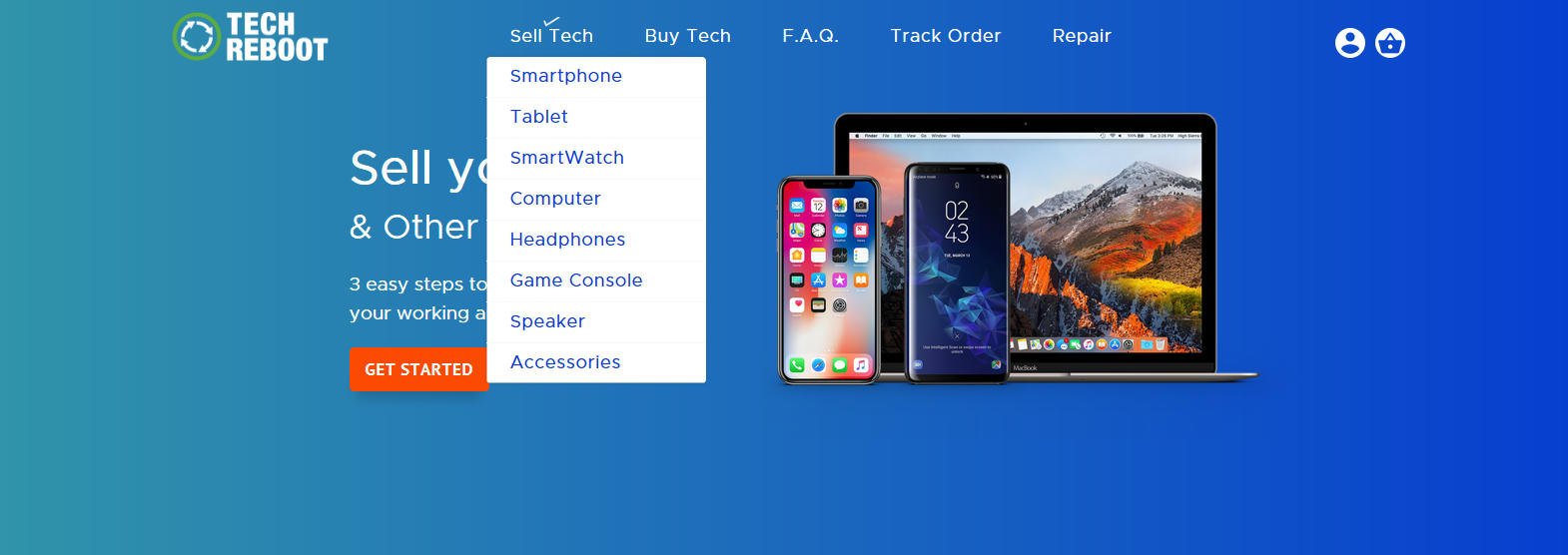
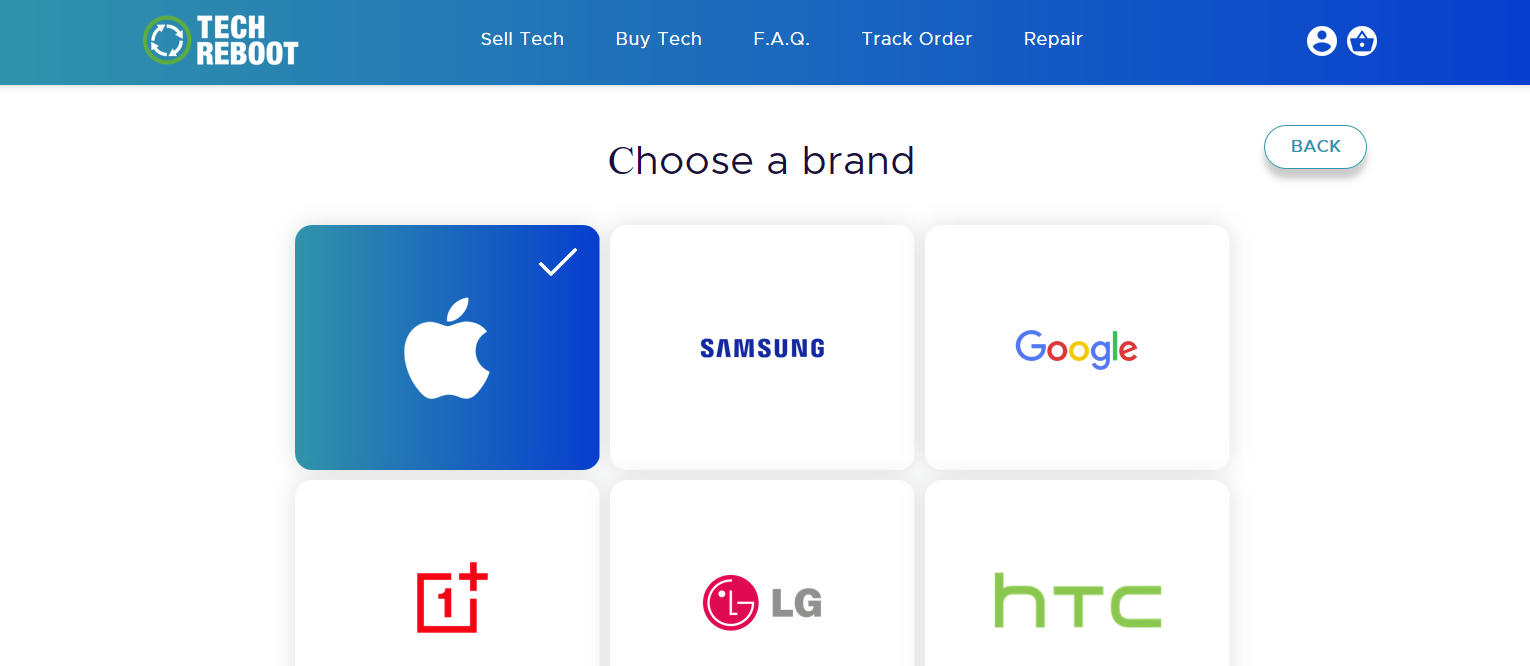
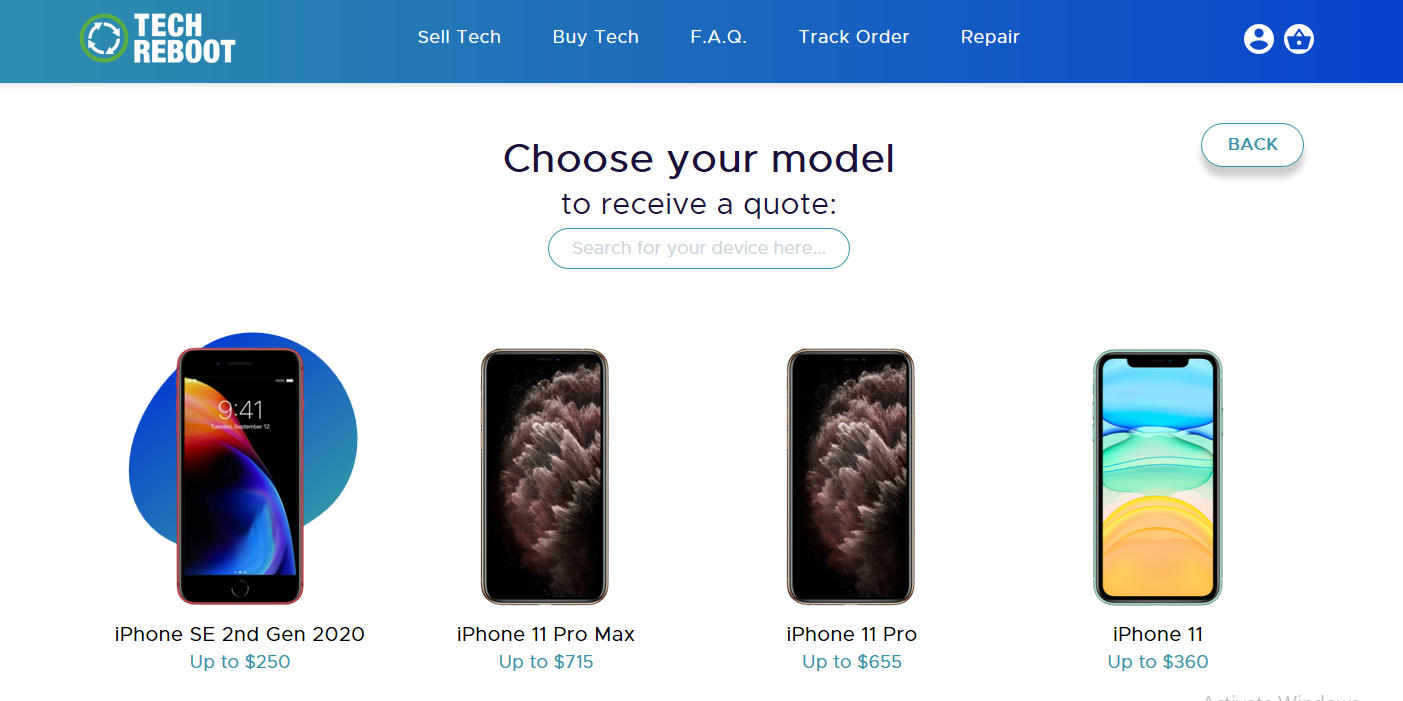
    To make your selling process easy, first visit our site. When on the homescreen, hover over Sell Tech and select Smartphone. From there, you are able to choose your phone’s brand, model, storage and carrier details. The final step is to select the quality of your phone- in this case you would select Broken- and our offered price will appear.

    Selling Your Broken Phone - Select Sell Tech then Smartphone

    Hover over Sell Tech and select Smartphone.

    Selling Your Broken Phone - Choose the brand of your Smartphone

    Choose the brand of your smartphone.

    Selling Your Broken Phone - Choose the model of your smartphone.

    Choose the model of your smartphone.

    Selling Your Broken Phone - Choose your smartphone’s storage and carrier details.

    Choose your smartphone’s storage and carrier details.

    Sell Your Broken Phone - Choose the appropriate condition of your phone.

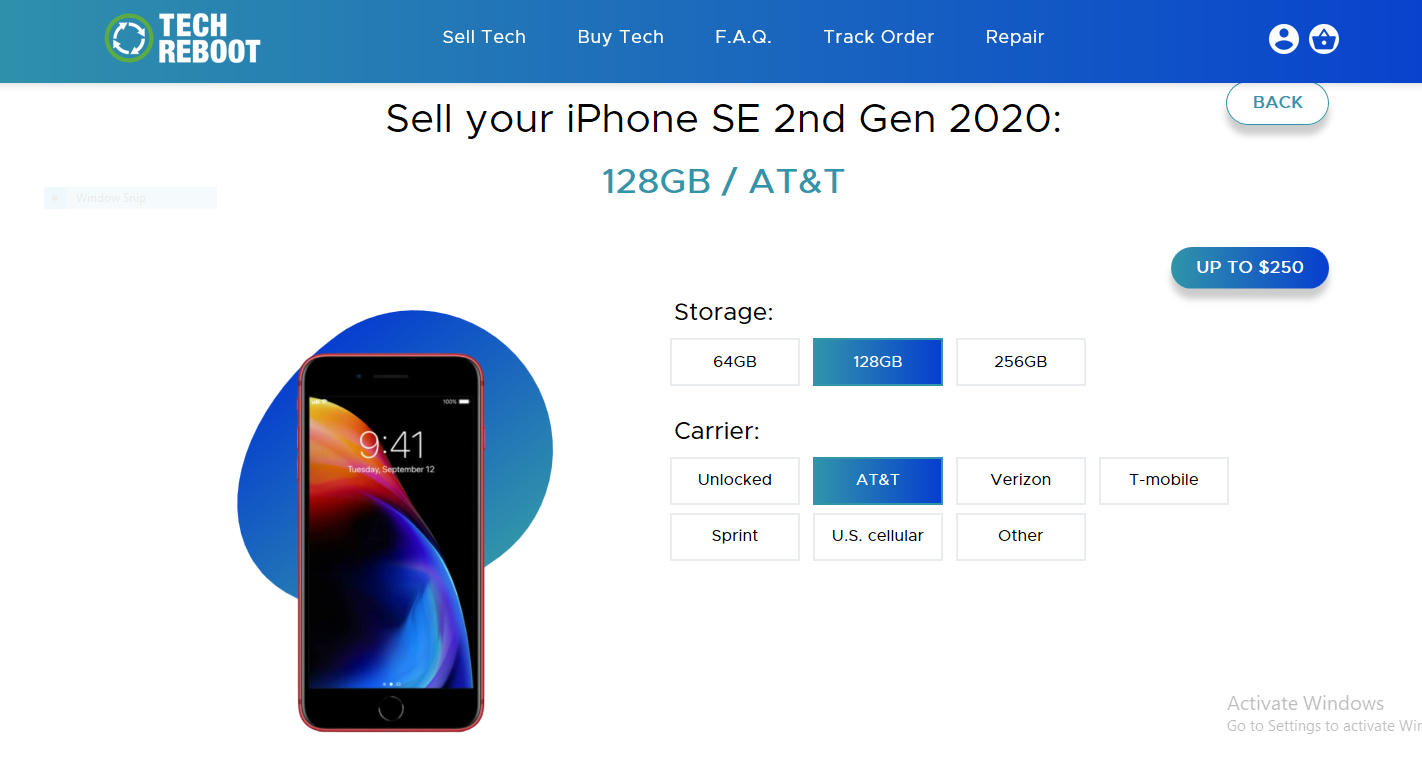
    Choose the appropriate condition of your phone. Our offered price will then appear.
    (This is the result for a broken Apple iPhone SE 2nd Gen 2020 with 128 GB from AT&T, current as of Nov 2020. Values will change over time.)

    Let’s say your phone dropped and is not in the best condition, but you still don’t know what to select.

    At Tech Reboot, a smartphone is considered broken if:

    • The device has some issues
    • Cracked glass
    • LCD burn
    • Bad microphone
    • Bad speaker
    • Bad camera

    Once you accept the offer and fill out basic information, a shipping label and packing slip will be sent your way!

    Payments typically take two business days upon arrival and are done through trusted vendors such as:

    • Apple Pay
    • Zelle
    • Cash App
    • Venmo
    • PayPal
    • Amazon GCard
    • Google Pay
    • Facebook Pay
    • Check

    Tech Reboot also accepts tablets, computers, smartwatches and other smart devices.

  • How to Wipe (or Recover) Data from your Android Smartphone

    How to Wipe (or Recover) Data from your Android Smartphone

    This article explains the details of how to wipe your Android smartphone. Some of the details apply to iPhones as well, but the instructions might differ for Apple devices. Erasing your phone, often called a factory reset, removes all personal files (photos, videos, documents), deletes all installed apps, and clears all logins and configuration settings. Essentially it restores the phone to its original, out-of-the-box state.

    Reasons to Wipe Your Android Phone

    There are a few good reasons why someone would want to wipe their phone. It usually doesn’t take long and a freshly restored phone will run as fast as it ever can.

    Selling Your Phone

    If you are going to sell your phone, it may be a good idea to erase it beforehand. Here at Tech Reboot, we factory reset every phone before it leaves our warehouse. However, if you are giving your phone to someone in person after an upgrade, donating it to an organization, or bringing it to a pawn shop, who knows what they will do with it. The safe bet is to factory reset your device.

    Clear the Clutter and Junk

    As we use our phones, data tends to build up. Apps collect cached data with every tap or swipe. Games and streaming apps both download media files that can quickly fill up your phone. The photos and videos we record add up in storage size. Wiping your Android says bye-bye to all of this data.

    Remove Harmful Malware

    Malware, aka malicious files that try to steal your clicks, data, or even money, continues to be a problem for Android users who may have visited shady websites or clicked a link in a phishy email. Erasing your Android phone can clear up mostly malware issues, usually.

    Spring Cleaning

    Every now and then you just want to start over. If the amount of files and apps on your phone has gotten so cumbersome you can’t see any quick way to manage them anymore, maybe it’s time for a restore. You can factory reset your phone, and ask yourself what apps you really need to have installed. Your phone will probably get a new zest for life, and you will feel as free as the early days of getting a new phone.

    If You Just Want to Free Up Some Android Space

    If you landed on this article and you simply want to free up some space on your Android, not completely erase it, there are a few quick things you can do.

    Clearing your app’s cache files can be done from Settings > Apps. The storage size of each app is listed. You can click on any app and clear the files. If you choose Clear Cache, only downloaded files are erased. If you choose Clear Data, your login info for that app will be cleared as well, requiring you to login the next time you open the app.

    How to Erase Your Android Phone

    1. Open the Settings app.
    2. Tap System > Advanced > Reset options. If you don’t see “Advanced,” tap Reset options.
    3. Tap Erase all data (factory reset) > Reset phone. If needed, enter your PIN, pattern, or password.
    4. To erase all data from your phone’s internal storage, tap Erase everything.

    Important: Settings can vary by phone. For more info, contact your device manufacturer.

    How to Restore Data on your Android Phone

    If you want to restore your data to a factory reset phone, the method depends on whether or not you have a backup.

    Restore from a Backup

    Android users can backup their data and then restore it after a factory reset. Backup your data using Settings > Backup & Restore. Samsung users can backup to their Samsung account; all other Android users can select the Google backup options.

    Once you backup your data, you can factory reset your device. Restore your data and settings by going into the same settings and this time selecting Restore.

    Use Restoration Software

    If you have already factory reset your phone and do not have a backup, there are options that may help you recover some of your data if needed. A desktop application called Recoverit claims to have 98% recovery rate. An internet search of smartphone data recovery services may provide some local companies that offer those services.

    Photo by pan xiaozhen on Unsplash

  • Sell your Samsung Galaxy

    Sell your Samsung Galaxy

    If you have an old Samsung Galaxy S, or Galaxy Note and are considering selling it, this article will illuminate some details of the process, what to expect, and how to prepare your Samsung Galaxy for selling.

    The Galaxy line of smartphones has been a top selling Android product for years. They are great phones that can be worth good money. A major contributor to the value of your phone is the model or generation. Newer Galaxy models typically fetch more cash than older ones.

    If you are curious, no, we do not accept the Note 7 for 2.5 million reasons. Apologies for the four year old joke, but they were known to explode. If you still have one, call the bomb squad, not us.

    In addition to the model of your Galaxy, the value of your phone will vary based on our condition grade, as well as the carrier and storage capacity. Use our website to get a free instant value estimate of your Samsung Galaxy.

    How do you prepare your Samsung Galaxy to sell?

    We’d love it if you’d clean your phone before sending it to us – we don’t know where your phone has been – but these steps are also pretty important.


    Remove the SIM Card

    We recommend removing your SIM card (read more on SIM cards) before you sell your Galaxy to Tech Reboot. The location of your SIM card varies depending with the model of your Galaxy.

    Galaxy S5 and Earlier

    The SIM card is located under the removable back cover and battery.

    Galaxy S6 or Newer

    The SIM card can be found the side of the phone, opposite the volume buttons.

    Galaxy Note 8 or Newer

    The tray is on top the phone.


    Remove your Galaxy’s Google lock

    You will need to visit your Google account settings and remove your lock. This can be done from the Device Activity and Notifications settings. For detailed instructions, read how to remove your Google lock.


    Erase/Wipe your Galaxy

    This is an optional step, as we delete all personal information before phones that reach our warehouse go anywhere. Backup your data using a method of your choice and then factory reset your device.

    • From Settings, tap Factory data reset.
    • Tap Factory data reset again.
    • Tap Reset.
    • Enter your login when asked, if you have a lock set on the phone.
    • To delete all information and downloaded apps, tap Delete all.

    Get Your Instant Galaxy Value Quote

    Visit our Samsung smartphone selling page and get a free instant quote. You will need to choose your model, and then complete details about the capacity, carrier, and condition of your Samsung. Your quote will magically appear and then all you have to do is fill out some personal details and where you’d like your money sent!

    Photo by Jonah Pettrich on Unsplash

  • Where can I sell my iPhone in person?

    Where can I sell my iPhone in person?

    The time always comes when you are due for an upgrade, and you search for a place to sell your iPhone. You have many
    options available to you, but some are easier and safer than others. The question always arises, “where can I sell
    my iPhone in person?”

    Sites like eBay and Craigslist serve as online marketplaces to sell your stuff. eBay fees can stack up to nearly 15%
    of your selling price, then you have shipping fees, and packing materials. Then you have to deal with shipping it.
    It’s not always the best option.

    Other options like craigslist serve as a more risky option, which includes going out to meet up with a stranger at a
    random place, and having to exchange money.

    We have set up a network of safe-places to sell your devices to our partners, where you don’t need to worry about
    cash transactions. Our network uses safe payments such as Venmo, CashApp, Zelle, PayPal, among other options.

    If you are located in south Florida, or central Florida, Tech Reboot has partnered with repair firm iFixYouri to
    handle buybacks of devices in a safe retail environment. The devices still get handled by Tech Reboot in the end.

    How does the in-person sale of my phone work?

    1. Check out Techreboot.co to receive an instant quote.
    2. Print out a copy of your quote and bring it to any of our partner locations.
    3. A technician will inspect and test your device.
    4. Quote will be verified at time of inspection to ensure that it matches what the device’s actual condition is.
    5. Payment will be sent to your choice of payment.

    We make the process extremely simple and pain-free.

    Remember, please make sure that your device make, model, and condition is accurately marked. We assure you that if
    you accurately grade it according to our descriptions, your payout amount will be what was quoted.

    At the end of the day, it’s your device and your decision. We urge you to make the safest(which may not always yield
    you the most money), choice. Shipping it off to sell keeps things contact-free and easy to track. If you do decide
    to sell in-person, never meet at your home, and always meet in a public place, like iFixYouri.

    Should you have any questions on how to proceed, please feel free to reach out, we’ll be happy to help you out!

    Photo by David Veksler on Unsplash

  • What should I do if I sell my iPhone?

    What should I do if I sell my iPhone?

    So you’ve decided to sell your iPhone. What steps do you need to take now?

    Backing up your data would be a good first step if possible. We do not provide backups in any form and your data will be erased.

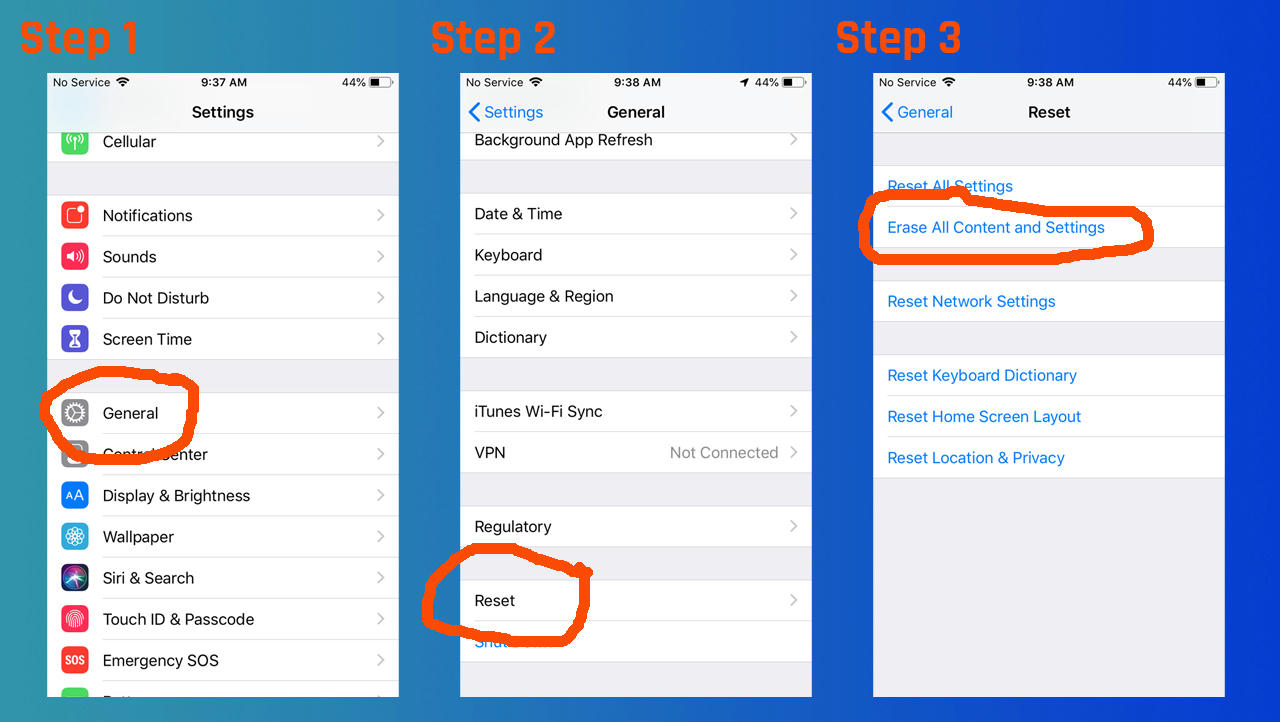
    Another important step is to remove your iPhone’s activation lock. This ensures we can quickly provide you payment for your device. This can be done by going to Settings > General > Reset > Erase All Content and Settings. Then enter your Apple ID and password.

    how to factory reset your iPhone

    Likewise, you can remove your activation lock remotely with any internet-capable device. If you forget to remove your activation lock before sending us your iPhone, we will be contacting you to walk you through these steps.

    How can I sell my iPhone safely?

    We have been purchasing and selling smart devices for a long time via our sister company iFixYouri. One of our top aims is to provide trustworthy, reliable transactions for every customer.

    Your iPhone is safe with us should you choose Tech Reboot’s buyback service. Tech Reboot is a registered business with the state of Florida. All devices including smartphones, tablets, and computers, never leave our warehouse until they are erased and restored to factory defaults.

    Types of devices that get erased and factory restored

    • Smartphones
    • Tablets
    • Computers
    • Smart watches
    • Anything with digital storage!

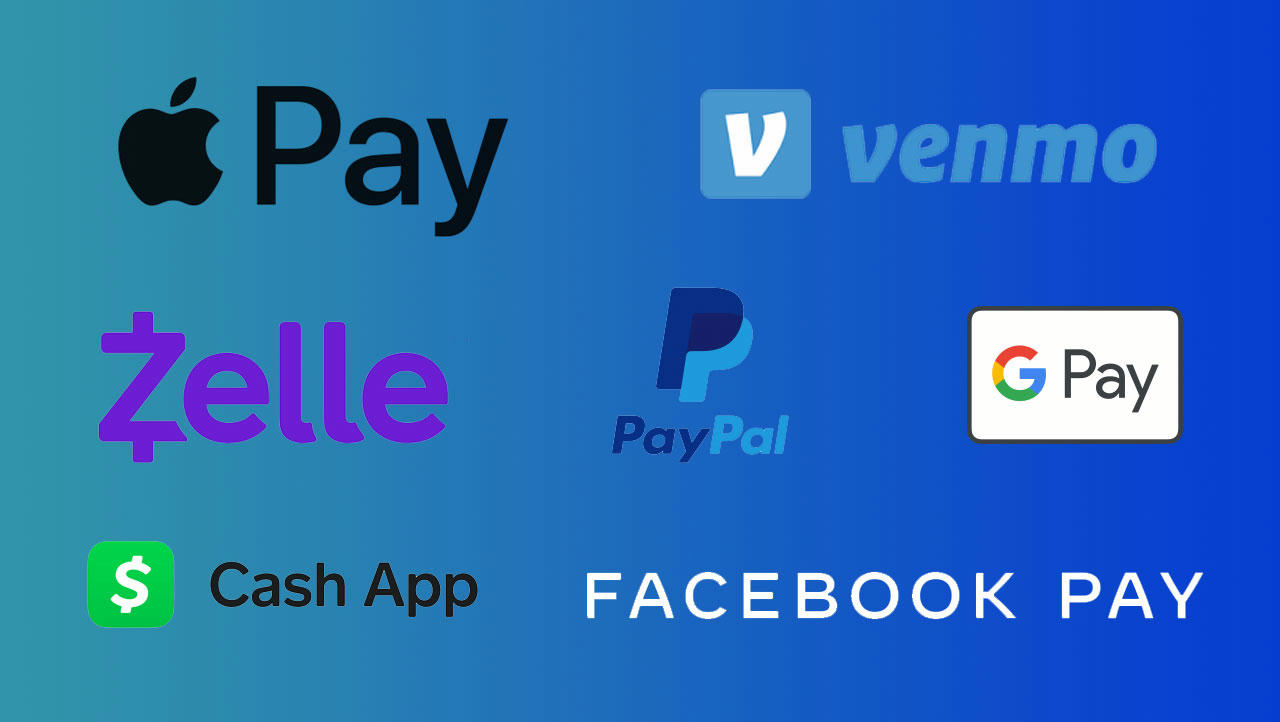
    Our payments are all made through industry-standard, trusted third-party payment websites.

    Our trusted payment vendors

    • Apple Pay
    • Zelle
    • Cash App
    • Venmo
    • PayPal
    • Amazon GCard
    • Google Pay
    • Facebook Pay

    payment method logos

    Where can I sell my old cell phones?

    That’s an easy one: head to our smartphone selling page.

    Using the phone value calculator

    1. Choose your make and model
    2. Provide some details about your device (model, carrier, capacity, etc)
    3. Get your free value estimate!

    Sending your device to us is really easy with the shipping label and packing slip we email you. Once your old cell phone is received in our warehouse, you can expect payment by the method of your choice within 2 business days.

    Photo by Justin Main on Unsplash

  • How does grading of my phone, tablet, or computer work?

    How does grading of my phone, tablet, or computer work?

    The time has come to sell your device. The question will arise of how do you determine the condition of your phone, tablet, or computer. What may be perfect condition to some, will in fact be average/good condition to someone else. It’s super important to make sure that accurate
    grading is achieved selling your device. 

    Devices come in all sorts of grades and conditions. Grading is a key factor when it comes to making sure that a
    device is purchased at the correct price, for both the consumer and the business purchasing and reselling the device. If a device is mis-graded, then the person(s) selling the device could either make out great, or not so great.

    At Tech Reboot, we keep our grading scale quite simple and straightforward.

    How do I make sure I pick the right grading of my device?

    We want you to get the most accurate value quote as possible. This makes it easier to keep your payment predictable and for us to keep you happy with your Tech Reboot experience. To that end, we have created a grading key, shown directly below, that anyone can use to provide a reliable device condition.

    Grading Conditions

    New In Box

    This refers to a device that is sealed in box and never been used. It must have the original seal, all accessories, and packaging. This type of device will yield to the customer the highest amount of return.


    Flawless

    This will indicate that the device is in perfect, mint condition. There are
    no scratches and the device shows signs of no use.


    Good

    A good condition device will show normal signs of wear and will have
    scratchs, light nicks, minimal(if any) dents. Wear around the charge port will
    be present. All key functions should work perfectly, including, but not limited
    to FaceID, power button, volume up and down, speakers, ear speaker, cameras,
    wifi, and blue tooth. The device should be free and clear of any liquid damage.


    Fair

    A fair condition device will show heavy signs of use which includes scratches
    on the frame and housing, the front glass will have scratches but no cracks,
    and the back will have scratches, nicks, or dents, but no cracks or separation.


    Broken

    A broken device will have a key function or item that does not work. The device
    may have cracked front glass or back glass. Power button, volume up or down
    buttons may not work. There may be other issues with the device. The device
    must be free and clear of any iCloud/Google locks.


    No Power

    A device that shows no sign of power
    will not turn on when
    trying to charge it or press the power button. The device may have board level
    issues that are not easily repairable. A no power device may also have other
    features that may be broken, like a cracked screen or broken back glass.


    Questions about your device’s condition?

    Majority of the devices that we receive at Tech Reboot arrive in good or fair condition.
    We do our best to ensure accurate descriptions, which ultimately help our
    customers pick an accurate match to their device that they sell.

    If you have any questions regarding your grading as you’re purchasing a device,
    please feel free to reach out and ask, we’ll be happy to accommodate.

    Photo by Oleg Ivanov on Unsplash