Category: Apple

  • Sell your jailbroken iPhone or iPad: What you need to know

    Sell your jailbroken iPhone or iPad: What you need to know

    What if someone told you they had a jailbroken iPhone for sale? Would you hesitate to accept their offer? Well, you’re not alone. Apple feels the same way. 

    Jailbreaking is a process in which people bypass software restrictions enforced on iOS and Apple products. In return, users install applications, extensions, and other software programs not approved by Apple. 

    Besides downloading apps, people jailbreak iPhones and iPads to:

    • Remove and delete preinstalled apps 

    • Customize the control center 

    • Unlock, or gain access to other wireless carriers 

    According to Apple, jailbroken devices violate their warranty plan and are at risk of poor security and other issues.

    • Your device is not secure: Jailbreaking an iPhone or iPad increases the risk of having your personal information stolen, device damaged, and viruses installed by hackers. 

    • Your device is unpredictable: Jailbreaking causes your device to crash unexpectedly, freeze when apps are open, and lose data.

    • Your device has a short battery life: Jailbreaking causes your battery to drain quickly and shortens the device’s use on a single battery charge.

    • Your device is unreliable: Jailbreaking causes dropped calls, slow and unreliable data connections, as well as delayed and inaccurate location input.

    • Your apps don’t work: Once your iPhone or iPad is jailbroken, iCloud, FaceTime, Apple Pay, Visual Voicemail, Weather, Stocks, and iMessage will no longer work. 

    This means that once your device is corrupt, Apple will not consider taking it back for a trade-in.

    Where can you sell a jailbroken iPhone or iPad? 

    Once the damage is done and you are left with a phone that barely works, there are only a few ways to sell your iPhone and make a profit. 

    Oddly enough, some people find jailbroken devices to be more valuable than those with the original factory settings. This all goes back to the idea of people being able to freely download software. 

    On eBay, jailbroken iPhones range from $100- $600, and iPads range from $50-$250. Are these prices worth it knowing the risks that come along with the devices? 

    There are also tech companies that will buy back unwanted devices, even when damaged. 

    To prepare your device for sale and increase your chances of making the most money possible, it is strongly recommended that you undo the jailbreak settings from your device by accessing iTunes or Recovery Mode.

    Jailbreaking became popular in 2008, but since then, Apple has developed software like iOS 14 that allows people to customize their devices. So rather than invest in a jailbroken iPhone or iPad, upgrade to a device that you know will function properly. 

    Photo Credit: Caspar Camille Rubin via Unsplash.com


  • When’s the right time to sell my Apple watch?

    When’s the right time to sell my Apple watch?

    The first Sunday of every November is the start of daylight saving, which means that you have to manually adjust every clock in your home and workplace if devices aren’t smart enough to do it automatically. Now you’re dealing with a wall clock, the time on your stove, and the time displayed in your car. With so many devices displaying the time at once and your phone already on hand, you don’t know why you even bother owning an Apple watch. 

    The Apple watch gained popularity in 2015 for its modern look and ability to tell the time while also being able to track fitness, display notifications and make messaging easy.

    Despite the Apple watch’s convenient features, people still find that they use their smartphone more due to: 

    • The small display screen

    • Not being able to properly brows the web

    • Not being able to access the same apps on their phone 

    • The short battery life 

    • The bulky look 

    Even though it is great competition, an analog watch or smartphone will probably never be entirely replaced by an Apple watch due to their long battery life and access to detailed information and notifications.  

    If you notice that you are no longer using your Apple watch as much as you used to and are looking to sell it, there are things to consider if you want to make the most cash. 

    While Apple, Best Buy and phone carriers do offer store credit, gift cards and trade-ins, if you are not looking for a device upgrade, there is probably no point.

    Stores 

    Apple Watch Series 1

    (in great condition)

    Apple Watch Series 2

    (in great condition

    Apple Watch Series 3

    (in great condition)

    Apple Watch Series 4

    (in great condition)

    Apple Watch Series 5

    (in great condition

    Apple 

    Store Credit or gift card 

    Store Credit or gift card 

    Store Credit or gift card 

    Store Credit or gift card 

    Store Credit or gift card 

    Best Buy 

    Gift Card 

    Gift Card 

    Gift Card

    Gift Card 

    Gift Card

    Carriers 

    Trade-in

    Trade-in 

    Trade-in 

    Trade-in 

    Trade-in 

    Tech Reboot 

    Cash 

    Cash 

    Cash 

    Cash 

    Cash 

     Marketplaces such as eBay is another place to sell if you want your Apple watch out of your hands, but other people have the same idea. Searching for the Apple Watch Series 1 alone brings up over 1,200 options. 

    You may make money… eventually, but if you are looking to make cash quickly and get a free instant quote, Tech Reboot is a great option when looking to sell your Apple watch. 

    How to sell your Apple watch with Tech Reboot

    Visit our Apple smartwatch page and get a free instant quote. You will need to choose your model, and then complete details about the size, case type, carrier and condition of your Apple watch. Your quote will magically appear and then all you have to do is fill out some personal details and where you’d like your money sent!

    Whether your Apple watch is in excellent condition or broken, Tech Reboot still finds it valuable.


  • Where can I sell my iPhone in person?

    Where can I sell my iPhone in person?

    The time always comes when you are due for an upgrade, and you search for a place to sell your iPhone. You have many
    options available to you, but some are easier and safer than others. The question always arises, “where can I sell
    my iPhone in person?”

    Sites like eBay and Craigslist serve as online marketplaces to sell your stuff. eBay fees can stack up to nearly 15%
    of your selling price, then you have shipping fees, and packing materials. Then you have to deal with shipping it.
    It’s not always the best option.

    Other options like craigslist serve as a more risky option, which includes going out to meet up with a stranger at a
    random place, and having to exchange money.

    We have set up a network of safe-places to sell your devices to our partners, where you don’t need to worry about
    cash transactions. Our network uses safe payments such as Venmo, CashApp, Zelle, PayPal, among other options.

    If you are located in south Florida, or central Florida, Tech Reboot has partnered with repair firm iFixYouri to
    handle buybacks of devices in a safe retail environment. The devices still get handled by Tech Reboot in the end.

    How does the in-person sale of my phone work?

    1. Check out Techreboot.co to receive an instant quote.
    2. Print out a copy of your quote and bring it to any of our partner locations.
    3. A technician will inspect and test your device.
    4. Quote will be verified at time of inspection to ensure that it matches what the device’s actual condition is.
    5. Payment will be sent to your choice of payment.

    We make the process extremely simple and pain-free.

    Remember, please make sure that your device make, model, and condition is accurately marked. We assure you that if
    you accurately grade it according to our descriptions, your payout amount will be what was quoted.

    At the end of the day, it’s your device and your decision. We urge you to make the safest(which may not always yield
    you the most money), choice. Shipping it off to sell keeps things contact-free and easy to track. If you do decide
    to sell in-person, never meet at your home, and always meet in a public place, like iFixYouri.

    Should you have any questions on how to proceed, please feel free to reach out, we’ll be happy to help you out!

    Photo by David Veksler on Unsplash

  • What should I do if I sell my iPhone?

    What should I do if I sell my iPhone?

    So you’ve decided to sell your iPhone. What steps do you need to take now?

    Backing up your data would be a good first step if possible. We do not provide backups in any form and your data will be erased.

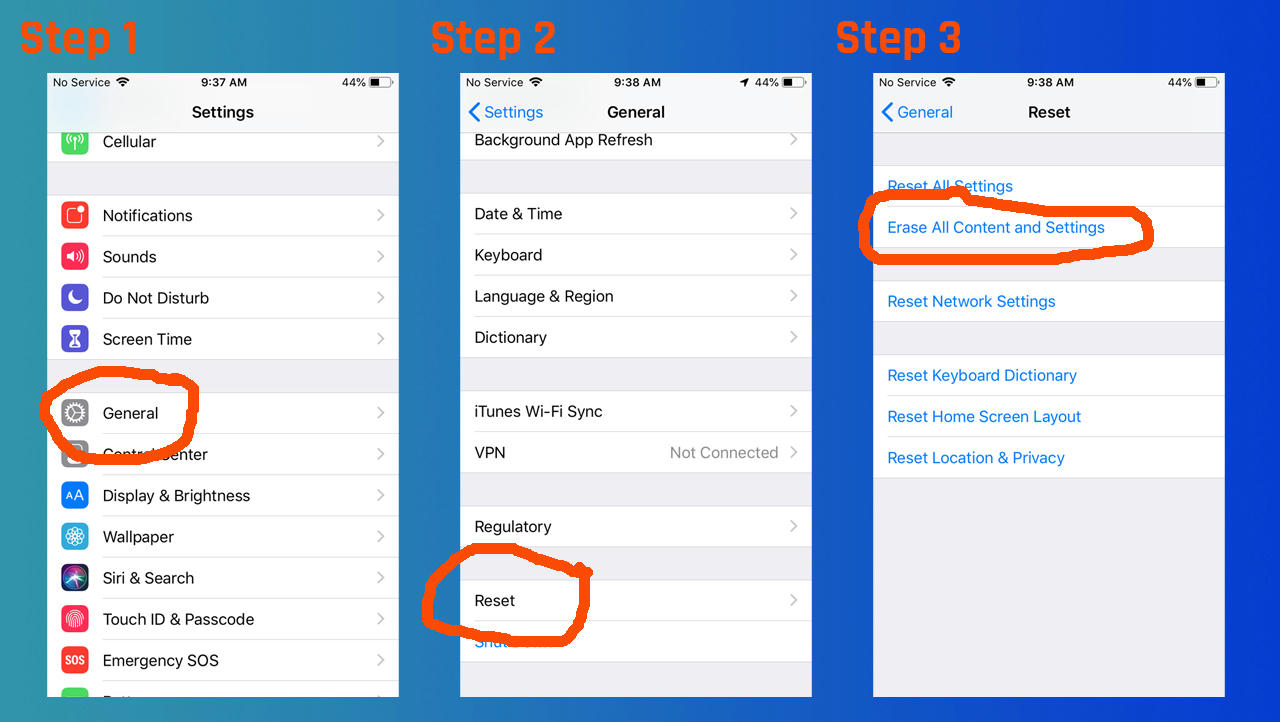
    Another important step is to remove your iPhone’s activation lock. This ensures we can quickly provide you payment for your device. This can be done by going to Settings > General > Reset > Erase All Content and Settings. Then enter your Apple ID and password.

    how to factory reset your iPhone

    Likewise, you can remove your activation lock remotely with any internet-capable device. If you forget to remove your activation lock before sending us your iPhone, we will be contacting you to walk you through these steps.

    How can I sell my iPhone safely?

    We have been purchasing and selling smart devices for a long time via our sister company iFixYouri. One of our top aims is to provide trustworthy, reliable transactions for every customer.

    Your iPhone is safe with us should you choose Tech Reboot’s buyback service. Tech Reboot is a registered business with the state of Florida. All devices including smartphones, tablets, and computers, never leave our warehouse until they are erased and restored to factory defaults.

    Types of devices that get erased and factory restored

    • Smartphones
    • Tablets
    • Computers
    • Smart watches
    • Anything with digital storage!

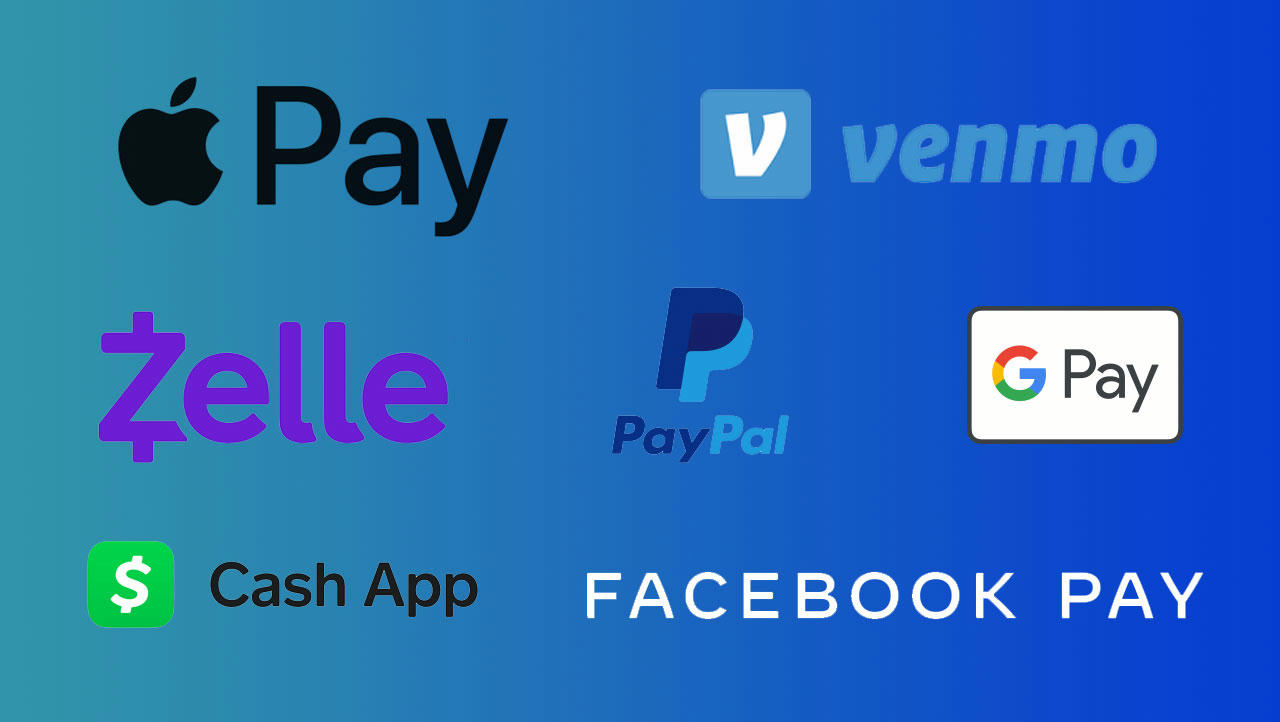
    Our payments are all made through industry-standard, trusted third-party payment websites.

    Our trusted payment vendors

    • Apple Pay
    • Zelle
    • Cash App
    • Venmo
    • PayPal
    • Amazon GCard
    • Google Pay
    • Facebook Pay

    payment method logos

    Where can I sell my old cell phones?

    That’s an easy one: head to our smartphone selling page.

    Using the phone value calculator

    1. Choose your make and model
    2. Provide some details about your device (model, carrier, capacity, etc)
    3. Get your free value estimate!

    Sending your device to us is really easy with the shipping label and packing slip we email you. Once your old cell phone is received in our warehouse, you can expect payment by the method of your choice within 2 business days.

    Photo by Justin Main on Unsplash

  • How can I sell my iPhone safely?

    How can I sell my iPhone safely?

    There are many ways that you can sell your device. Some of these ways may be unsafe, some of them could put you at
    risk, and then there are many ways that you can stay safe from the comfort of your own home.

    Backup Your Data

    Before doing anything, make sure that you’ve backed up your phone to ensure you don’t lose any data. This will help
    make sure that transitioning to a new phone will go seamlessly. The steps are different for Android and Apple users,
    so skip down to the part which applies to you.

    For iPhone Users

    If you’re signed into iCloud, it’s very likely that your phone is
    already backing itself up automatically whenever it’s connected to wifi. You can check this by going to
    Settings > Your Name > iCloud > iCloud Backup and verifying that it is turned on.

    iCloud storage is
    limited, and it can take a while to download all your data, so if you’re switching over to a new phone, you can do
    it quicker by backing up to iTunes on your computer.

    To backup via iTunes on your computer

    1. Plug your iPhone into your computer.
    2. Open iTunes.
    3. Click the iPhone button in the toolbar’s top-left corner, or (newer OS users) iPhone in the
      left column in Finder .
    4. Click the “Back Up Now” button.

    This could take a few minutes,
    but once complete, you’ll have your data and information backed up on
    your computer. Your new phone will prompt you to restore from this backup when you’re setting it up and it’s plugged
    into the computer.

    For Androids

    All Androids are a
    little different from the next, and you’ll likely have to
    do some searching to ensure everything is backed up before continuing.

    All of your contacts, calendar notifications and other data are probably already
    synced and paired with your Google account. You can select to auto-back up app
    data, call log history, device settings and notifications, photos and sms text messages by going to
    Settings > System > Backup. Once in this menu, just make sure the switch is turned
    on. It won’t hurt to go through everything and make sure your app data is backed up as well.

    If
    you’re logging into an app with a user account, it’s likely that it has been backing up your data
    regularly to that account. In some situations, you may need to manually
    create a backup file from that app’s settings menu.

    We’d recommend plugging your
    phone into your computer, and dragging those backup files onto your desktop. Make sure to drag over your
    pictures as well, just in case and then you can store them safely for
    your next phone.

    Make sure to buy a new phone, then transfer the data, before you sell your old phone. This will
    make sure the new phone is setup to your liking before wiping it and selling it.


    Erase Your Data

    Once you’ve backed everything up, it’s now time to erase all your data. This needs
    to be completed in a way that makes it not possible to recover your data. Do not just manually delete apps and
    pictures.

    iPhone Users

    If you have an iPhone, you can safely and securely erase
    all your data from your device by heading to
    Settings > General > Reset and tapping “Erase All Content and
    Settings.” When this is finished, the device will restart and it will return you to the
    “Welcome” screen you originally saw when you bought the phone.

    For Androids

    Majority of android
    devices are encrypted, but some are not. We do recommend a few extra steps before erasing
    your Android smartphone. Navigate your way to Settings > Security and look
    for an “Encryption” setting. If you see something that notes that your phone
    is encrypted, you’re all set — If not, tap “Encrypt Phone” to
    start the process. These instructions may vary from phone to phone since there are so many different androids
    out there.

    The encryption process could take a couple hours, so we’d recommend putting the
    phone on a charger when doing this. Once complete, navigate to Settings > System > Reset Options and
    select “Erase All
    Data (Factory Reset).” Once that’s complete, your phone will reset to factory default settings.

    For older androids, you may not have an encryption option.


    Before You Sell Your Phone

    Now that you’ve backed up and restored your device, you’re almost ready to sell it!

    Remove your old sim card and any SD cards that may still be in the device. These can store data. Removing them
    is the last essential step to making sure your device is safe and ready to sell!

    Clean the device using a disinfectant and a rag. Spray the rag and wipe it down
    thoroughly.

    Gather any charging cables and good condition cases you may have for it and get ready to get some
    cash for it! Typically, the more accessories you include, like the original charger, headphones and box, the
    more money you can get.

    Selling Phones In-Person and Online

    Sell on local marketplaces – This option is the most risky of all. You will have to go out meet up with a potential
    buyer. Time and time again we hear stories of someone going to sell their device and getting robbed or assaulted.

    Sell online via ebay – This option doesn’t always guarantee a sale at the price you’d like to get. Also, you’ll be
    liable for seller fees that get assessed after the sale, which can total up to 15% or higher, depending on how you
    setup your listing.

    Sell on Tech Reboot – This option is the simple option with no seller fees, free shipping, and a set price as long as
    it’s graded correctly.

    Keeping things simple is often the best way to make sure your safe and don’t need to worry about dealing with buyers
    who may return items, scam or do other things that frustrate you when all your trying to do is sell your electronics
    from home.

    Photo by Kelly Sikkema on Unsplash

  • How can I get money for my old iPhone?

    How can I get money for my old iPhone?

    Believe it or not, your old iPhone is worth something, even if it’s cracked, damaged, broken, or not powering on.
    This also goes for your old iPad, Dell laptop, MacBook, or other old personal electronics. Often the longer you wait
    to sell your old devices, the less you’ll receive for them.

    Chances are that old iPod that you have collecting dust in your nightstand is worth something. That old Apple Watch
    that has a cracked screen that’s useless right now… that’s worth something. The real questions are: where do you
    sell it and how can you get the most money for your old device?

    Where are you can take your device to sell it and get the most cash? It’s something that everybody asks others,
    Google, DuckDuckGo, Bing, or whatever your other favorite search engine may be.

    There are a lot of options out there. Some are easy. Some yield more money. Some may be sketchy. Some are ways you
    simply will not want to do or experience to cash in on an old iPhone. We’ve often heard stories of people getting
    robbed, getting scammed, or having a downright bad experience with the sale of their device.

    Selling Phones on Facebook

    Option one for places to sell your iPhone, smartphone, tablet, or computer would be to go on Facebook marketplace,
    take a picture, and add a price. Facebook is heavily integrated into the majority of our lives at this point.
    Selling something on the marketplace can seem like an easy maybe even a great idea.

    However, chances are you don’t wanna stranger showing up at your house. You also don’t want to just leave the device
    outside and hope that the stranger will pay you. I forget the name of what this is called but there is a term that
    people have adopted nowadays that they contactless exchange of goods and people are Jens getting taken for whatever
    they’re trying to sell.

    If you’re choosing Facebook marketplace, we highly recommend meeting at an extremely public place like Starbucks, a
    police station, a grocery store… somewhere that has a high degree of open visibility. This will help ensure your
    safety. You never want to underestimate your own risk, especially with all the craziness going on these days. Don’t
    go to somebody’s house to sell a device. If they truly have interest, they’ll come to you.

    Selling Phones on Craiglist

    The next option goes kind of hand-in-hand with the Facebook marketplace and that would be craigslist. On Craigslist
    you may run into some very strange close encounters – we’ve all heard the odd experiences that many people recap
    from doing business on craigslist. This isn’t a curb alert, this is your device. Your device carries value. Some
    people will try to undercut that value by lowballing you, scamming you, or just being cheap and pestering.

    Again just like the Facebook marketplace, if you are concerned about possible safety risks or just simply don’t want
    to haggle with a stranger, steer clear of Craiglist and opt for another method instead. Your personal safety and
    confidence are not worth compromising for the random possibility of a few extra dollars for your old phone.

    Selling Phones on eBay

    Next up we have eBay. eBay is a great platform to sell anything from your antique boots to your drawer full of flip
    phones and other gadgets that may now be collecting dust. It’s great to do some spring cleaning, gather some of your
    forgotten treasures, and throw them up on eBay to see what they earn.

    Buy It Now Pricing

    If you’re going to place the phone on eBay buy it now price, while nice to have a dollar amount set in your head for
    what you want for the device, might not always yield you the best price. It may end up sitting there forever
    if you’re looking to asking for too much for the device. This is a great method for contactless exchange so if that is priority for you, it’s worth getting a little bit less for that peace of mind.

    Auction Selling

    What we would suggest is just simply putting it up for an auction for 3 or 5 days to get the most views out of it,
    build up watchers, and then you’ll end up with a fair market value for most popular mobile devices. You might not get 100% of what
    you want out of it but it’ll get you a decent amount. Make sure your listing is accurate and your device is in
    good condition.

    This is a pretty tried and proven method of selling old mobile devices. Remember though, you will
    have to take care of shipping, use your time to go ship it, and pay eBay seller fees at the
    end of the month. These additional fees can easily add up to 15 or 20% of the selling price.

    Selling Phones on Tech Reboot

    Your last option is to sell it on Tech Reboot. Tech Reboot is always competitively pricing their buybacks
    and adjusting what they will give to customers for their devices. The process is quick and simple.

    1. Select the type of device you’d like to sell.
    2. Go through the checkout, you’ll receive a shipping label in your email box.
    3. Once you receive that shipping label, ship your device!

    A couple of days later you get paid with the secure payment method of your choice. The options are plentiful and,as long as you accurately grade your device, you’ll get what you were quoted.

    Grading is key when it comes to selling your device. There are many different grades in that many different options
    that help determine how much your device is worth. Make sure that whether you’re selecting to sell a Macbook Pro or a
    Samsung S9 plus, that you’re as accurate as possible selecting the right criteria of the device. This includes, but
    is not limited to, the condition, the storage, ram, the carrier, a year.. the options vary by device.

    Every one of these items helps accurately determine what your device is worth and it helps make sure that you are getting the best bang for your buck when selling your device. If you’re unsure check below and ask for live chat support and they’ll help you select the appropriate option for your device.

    Remember: safety is primary. It’s only a phone and if your safety is worth a couple of dollars, as it is with
    most, than selling it online is the way to go. If you’re okay with the risk of meeting a stranger in a parking lot,
    then try out one of your local market places, but this also may take longer than if you were to just process an
    order on Tech Reboot and be done with it.

    Using Tech Reboot, you know exactly how long it will take to get your money, and how much money you’re going to get. The time is now to crack open all your old drawers pull out your old devices, give them a good charge, and get them to a new home.

    Photo by Morning Brew on Unsplash
  • What stores can I sell my phone for cash?

    What stores can I sell my phone for cash?

    Bills come payments go and one thing often comes around or we might be a little shorthanded on cash, to where we
    start looking around and trying to see how we can get some additional funds into our pocket quickly. There are many
    options to get a bit of cash in your hand and often these options are easier than one might think.

    What Devices Can You Sell?

    Start looking around your house and seeing what you might have that is collecting dust and ask yourself a few questions. Are you attached to these devices? When was the last time you’ve used them? Can you part ways with it? If you haven’t used a device in the past six months, we recommend getting rid of that device while it still has some value.

    Maybe this dusty old device can put a few hundred dollars in your pocket or and help pay your electric bill, or put
    food on the table, or give you some extra spending cash that well bring a little joy into your life instead of it
    hiding in a drawer being useless.

    Many stores take devices as a trade-in or for cash all over the country. Apple does, Verizon and AT&T does,
    but often these places are giving you the bottom of the barrel credit on purchasing of a new device, as opposed to
    giving you cash that you can use to spend however you’d like.

    Selling Online with Tech Reboot

    Tech Reboot offers you a quick and simple way where you don’t even have to leave the comfort of your own home, to
    sell a cellular device. We offer a wide array of buyback services and we also offer device certified preowned sales.

    The options are endless, but the reality of it is if you can find yourself a trusted partner that’ll give you a good
    price for your device whether it’s broken or fully functional that’s where you’ll make your top dollar.

    Broken devices can still yield really good returns on your devices and carry a good amount of value if you bring it
    to the right place. At Tech Reboot, we specialize in purchasing used and broken devices smartphones, tablets, and
    computers.

    It doesn’t matter what condition the device is in, we typically can offer you some sort of payment for your device
    even if it’s in rough condition with a cracked screen, bad charging port, or faulty power buttons and home button.
    This also goes for computers and tablets.

    Our customer base is spread out all over the country from folks in Alaska who want to sell their device, down to
    sunny South Florida. There are satisfied customers from all over who have sent in their device and received a quick
    payment.

    iFixYouri Walk-In Locations

    If you’re located in Florida, our partner iFixYouri serves as a walk-in
    retail location to a cellular device. The probability of you being near one of our walk-in locations is slim, but if
    you are, we welcome you to come in. The majority of our customer base is spread throughout the US and Canada.

    If you’d prefer to bring it to an iFixYouri walk-in locations, the following addresses can help you out:

    1900 Okeechobee Blvd Suite A9
    West Palm Beach, FL 33409
    4259 Northlake Blvd
    Palm Beach Gardens, FL 33410
    5500 N Military Tr #32
    Jupiter, FL 33458
    75 E Indiantown Rd
    Jupiter, FL 33458
    256 E Altamonte Dr
    Altamonte Springs, FL 32701
    1200 E Colonial Dr
    Orlando, FL 32803

    While appointments are not required, they are recommended. Should you have any questions, please feel free to reach
    out and one of our reps will be more than happy to assist you.

    Photo by Jp Valery on Unsplash

  • How Much is my Apple TV worth?

    How Much is my Apple TV worth?

    Tech Reboot offers cash for used Apple TV’s. The trade-in price of your Apple TV varies with the model, condition, and included accessories. Fully functional devices obviously bring the most cash, but some Apple TV’s may have value even when broken.

    As time passes and new models come out, your older model will lose more value, so the best time to sell it for cash is right now. Make sure to include the remote control and power cable to maximize your offer.

    Tech Reboot constantly updates the values of popular electronics and smart devices to provide competitive payments to our visitors, with respect to other selling websites. We are confident you will find selling your Apple TV on our website a good value, as well as one of the most straightforward, easy-to-use user experiences available.

    Sell Your Apple TV for Cash

    Quickly get a quote for your Apple TV version using the search on our website or selecting Sell > Accessories > Apple TV. Fill out the details for your generation Apple TV accurately and your free quote will be displayed instantly.

    Tech Reboot’s goal is to make selling your Apple TV the fastest, easiest way online. You will receive a shipping label and packing slip via email so you can send your Apple TV as soon as you complete your quote.

    Selling your old or unwanted Apple TV for cash is easier than binging through Ted Lasso episodes with our website. Apple has released several generations of this awesome streaming device, so check our Apple TV selling page to see which versions are currently worth cash. The newest version of the Apple TV is the 5th generation, which has 4k resolution, and either 32GB or 64GB storage capacity.

    How Do I Sell My Apple TV?

    That’s easy. Just do this:

    1. Select Sell > Accessories > Apple TV
    2. Choose your generation Apple TV
    3. Answer questions about the storage, accessories, and condition of your Apple TV
    4. Ship your device to us with the included shipping label

    Photo by Li Lin on Unsplash

  • Why should I sell my used iPad?

    Why should I sell my used iPad?

    p>There are many reasons why you should consider selling your used iPad. More and more often people are finding themselves using their smartphone or laptop more frequently than their tablets. For many, their smartphone is the device they use during the daytime, and it has more of their apps and data stored on it.

    Online learning and working from home have both grown significantly. Many people are finding themselves in need of an iPad so they can use it for school and even business. If you travel a lot, an iPad can be a great tool to have with you. They’re great for watching movies, playing games, reading articles or ebooks, and learning.

    When It’s Time To Sell Your iPad

    If your dust-collecting iPad can get to a student, this would be well worth you selling it off. At the end of the day, there’s no real point in keeping a device that you don’t use. Our houses are filled with tons of items that we don’t use, so there’s no real point to forward and keep stuff that we don’t need.

    If your device happens to be cracked or broken, and chances are you are using it less and less you can turn that broken iPad and do some cash that you can use for a nice dinner for your family, or to pay some bills, or the stash away in savings. It’s not doing any good sitting inside your nightstand degrading.

    Preserving Your iPad’s Battery

    It is highly recommended that you don’t let your iPad sit stagnantly, collecting dust. If it sits for a while, the battery can degrade and get to the point where it is no longer usable. If you have to leave your iPad sitting around for a while, we recommend you charge the battery to at least an 85% charge for best battery longevity.

    This will help mitigate any kind of risk of it getting to the point where it will not power on again in the future. When batteries are stored empty, they lose capacity and ability to charge up. A used iPad that has a good functioning battery can be worth a good bit of money. A cracked iPad can also be worth some money to a buyer that has the capabilities of refurbishing a device.

    If You Decide Your iPad to Sell to Tech Reboot

    Whatever your use for your iPad maybe, taking basic precautions like making sure the battery does not stay empty will ensure the longevity of your tablet, whether you decide to keep it or sell it. If you decide to sell it it make sure you do so responsibly and safely, as there are many folks out there that need a good working device to help them with their day-to-day tasks.

    Photo by Patricia Prudente on Unsplash

  • How to prepare my used MacBook for sale?

    How to prepare my used MacBook for sale?

    There are several steps that you should take before selling your MacBook.

    The first thing you should always do is purchase your replacement device.
    Before erasing anything off your old device, make sure that you have your new device so that you can get it all set up to the way you want it before removing anything off of your old computer. This is essential and will make your life 1 million times easier. Getting all your data transferred over to the new device and starting to use the new device before selling your old device will help make sure that nothing is missing and that you have everything you need.

    Where to Store Your Backups

    Data is very important to everybody nowadays and making sure that your data does not get into the hands of other people is critical. All the different methods of backing up your device can be very confusing as well.
    Some use back up drives, some use cloud storage, offsite storage, on-site storage, so many different names, what do
    they all mean?

    They all mean pretty much the same thing. Cloud storage and off-site storage refers to data centers that are storing
    your information for you. Backup drives and on-site storage refers to a physical drive that you would plug into your
    computer to back up your data.

    The risk with on-site storage is that there are very limited redundancies to help
    ensure that your data will never be lost. If you’re on-site hard drive fails, you risk losing all of your data
    permanently.

    The wonderful thing about cloud storage and offsite servers is that 99.999% of them carry some sort of
    redundancy so if one of their servers fails, your data will still be safe and secure because there
    will be backups for backups.

    There are a few steps that you have to take when selling a device.

    Step 1 – Backup your MacBook’s Data

    If you have a PC there’s plenty of software options available to help you back it up locally.
    There are also several websites that you can easily access and sign up for that will automatically run a reoccurring
    backup of your device.

    Your documents are the most important turn your documents are the most
    important to ensure that you have saved along with your pictures. You don’t want to lose your pictures, as you will
    never be able to replace them if they are lost.

    Dropbox and Carbonite offer great solutions for backing up your
    data. If you need help in backing up your data, there are professionals out there that can help you with your data
    back up as well as setting up a new device.

    Step 2 – Sign out and Remove Passcode

    If you’re selling a MacBook, make sure you signed out of iCloud and that
    you are signed out of any software or FiOS locks that may exist on the computer. The last thing you wanna do is sell
    somebody a computer that has your locks on, you’ll end up with a very upset customer or buyer.

    The next
    step that you want to do is to completely wipe the device and reset it to its factory defaults. Factory defaults are
    exactly what it sounds like, the device is wiped and free and clear of any kind of personal data. This will ensure
    that your data doesn’t go into the wrong hands.

    To reset your device to factory defaults follow the
    bootup prompts if you’re using a PC, Typically pushing the F5 key or F10 when starting up the computer will prompt
    a boot up to save mode or a factory reset.

    Step 3 – Clean Your MacBook

    The last and final step when getting your device ready to sell would be to give it a proper
    cleaning. Spray a rag with Windex and wipe down the entire device. This will make the device nice and clean for the
    buyer and it will give it an overall better grade than if you were to leave the keyboard dirty and crusty with a
    screen full of fingerprints. No one wants your old germs on their device, it’s the right thing to do.

    One last, but very important quick step, you should make sure you fully charge the battery so that when your buyer
    receives your device it easily boots up and starts working. You don’t want to run into a situation
    where someone thinks a device that you sold them does not work. That could cost you time and money and a lot of
    frustration on both your end and your buyer’s end.